
Hi, I'm Ryan, CTO at airCloset.
Disclaimer: "cortex" and "cortex-product-graph" referenced in this article are internal code names for an AI platform developed in-house at airCloset. They are unrelated to existing commercial services such as Snowflake Cortex or Palo Alto Networks Cortex.
In Part 1 (Series Intro), I wrote about how AI handles PR reviews and incident response on top of a platform we call cortex. At the center of that flywheel is the Product Graph (implementation name: cortex-product-graph, or cpg) — a unified knowledge graph of code, docs, DB schemas, and infrastructure definitions, queryable through semantic search.
In Part 1, I described cpg at a high level: "all of cortex is indexed in one graph." This post goes deeper — how it's built, why we landed on this design, and what actually changed once it was in place.
Series Index
| # | Theme | Key scene | Article |
|---|---|---|---|
| 1 | Series intro: cortex's harness | PRs auto-merge / incidents self-heal before you notice | ai-harness-intro |
| 2 | Product Graph (cpg) | Code, docs, DB, infra unified into one graph | this post ← you are here |
| 3 | AI PR review | webhook → AI review → auto-fix → squash merge | cortex-auto-review |
| 4 | Self-Healing + observability + auto-added guardrails | Alert → AI investigates → fix PR + new lint/type gate → auto redeploy + same-pattern writes get auto-rejected | cortex-self-healing |
| 5 | Democratizing the maintenance phase | Domain experts open PRs to production; the harness owns the quality gate | cortex-non-engineer-prs |
| 6 | Series Final | The underlying philosophy plus a retrospective on the failures and lessons | cortex-philosophy |
Start with One Scene
"I want to change the calculation logic behind the 'bug rate' KPI on the dashboard. Where is it, and what might break?" — imagine that question comes up before you touch any code.
When you ask an AI this directly, with no function name and no file path given, it hits cpg with a semantic search and pulls the relevant nodes in one shot. What comes back isn't just functions — it includes BigQuery tables and API endpoints alongside the code. And at the end of the response, there's a "next action candidates (Runbook)" block that tells the AI to re-probe starting from the BQ table with the most reads and writes flowing through it.
The final answer looks like this:
- Calculation site:
calculateRatePer100pt/calculateBugCount— both pure functions with no I/O side effects; safe to change in isolation - Writers (upstream):
syncKpiMetrics/writeKpiMetrics/backfillKpiMetricsall write to thekpi_bug_rate_per_100pttable; these are the real aggregation batch jobs - Readers (downstream):
BigQueryKpiRepository.getSummaryByDatereads via BigQuery →/kpi/bugsAPI → KPI dashboard page - Related docs:
docs/generator/kpi.mddefines bug rate; updating the code without updating docs would leave them stale
"Update the docs together, and schedule the deploy when the aggregation batch isn't running" — that's a decision you can make with confidence.
I personally know all this — I wrote it. But that's exactly the problem: anyone else who wanted to touch this had to track me down. Three months ago, "finding out where something lives and what would break" meant finding me. Now, this same investigation is done by PMO members (non-engineers) using cpg on their own. grep didn't get them there; documentation didn't get them there. One natural-language question did.
What makes that possible is cpg — a graph where you can follow "what you want to do" in plain language to the relevant nodes in one or two hops, even when you don't know the function name. The Runbook structure — where the tool's return value itself contains the next tool call to make — is what lets the AI re-select its starting point and drill deeper on its own.
That's the setup. Now let me explain how it's built.
What Static Analysis Alone Couldn't Do
cortex has a separate system that graph-analyzes the production codebase using static analysis (I'll write about this in its own post — just touching it here). It parses JS/TS code with AST analysis across our external-facing production repos, automatically extracting function call graphs, API endpoints, DB access patterns, and event pub/sub relationships.
This works well for what it does, and we still use it actively in the production repos. But when we tried applying the same approach to cortex itself, it didn't get us where we wanted to go.
Three specific gaps:
- No context — nodes exist but carry no meaning. "What is this API for?" "Why does this column exist?" isn't in the graph. Ask "where is the code that calculates the KPI bug rate?" and you'll miss unless the function name happens to look like it.
- No entry point — you already have to know the file path or function name before search can start. "Let me go find it" doesn't work.
- Explosion after 1–2 hops — starting from any node, related nodes multiply exponentially within a couple of hops, far exceeding what an AI can process in one context window. Trace results become too long to use.
The summary: mechanically accurate, but no semantic weighting. To be genuinely useful to AI, you need one more layer: "what matters, and why things are connected."
Meanwhile, DB Graph Was Working
Around the same time, a different approach — the DB Graph MCP we'd built — was working exactly as intended.
DB Graph is an MCP server with access to 15 schemas and 991 tables inside cortex, supporting semantic search over tables and columns with AI-generated descriptions. A natural-language query like "tables related to return processing confirmation" would find semantically connected nodes even when the table name doesn't contain those words.
After thinking about why this worked, the answer became clear: DB Graph has a business-context description attached to every node, and that description is what feeds into the embeddings. That semantic weight is what "finding by meaning" actually runs on.
Static-analysis code graph had none of that. Type relationships and call graphs exist — but "why this function exists" was never written anywhere.
The Hypothesis — Bring DB Graph's Essence into the Code Graph
The hypothesis was simple:
"A business-context description on every node, loaded into embeddings" — if that's the core of why DB Graph works, then doing the same thing for the code graph should structurally overcome the limits of static analysis.
The problem was: where do you put the "business context"?
All the options:
| Location | Example | Problem |
|---|---|---|
| External docs | Design docs / wiki / Notion | Separate from code. Drifts instantly. Nobody maintains it. |
| External metadata | Sidecar YAML / *.meta.json |
Dual-management. Breaks on rename. |
| Dedicated graph DB | Write annotations directly into Neo4j / Neptune | Dual-management again. Doesn't show up in PR diffs — unreviewable. |
| TypeScript decorator | @GraphNode({...}) in code |
Lives in the transpiled output = runtime dependency. Can't be extracted by AST alone. |
| DSL file | Custom .graph file format |
High learning cost. No editor support out of the box. |
| JSDoc comments | @graph-business / @graph-connects |
Physically co-located with the code. Extractable by AST alone. Zero runtime dependency. |
The choice of JSDoc over decorators was intentional:
- Zero runtime dependency: decorators survive into the transpiled output and can affect runtime behavior. JSDoc has no executable runtime semantics; with production builds that strip comments, it leaves no runtime artifact.
- Generalizes beyond TypeScript: the same
@graph-*syntax can extend to Pulumi definitions ininfra/and Markdown frontmatter indocs/. Decorators are locked to TypeScript syntax. - Single AST pass: ts-morph can walk declarations and extract JSDoc in one scan. Decorators sometimes require type resolution, which slows builds.
- Shows up naturally in PR diffs: JSDoc sits directly above the code it annotates, so when code changes, the JSDoc diff appears in the same file. Reviewers can't miss it.
- Doubles as documentation for both humans and AI: JSDoc already serves as IDE hover text and AI-readable context. Putting
@graph-businessthere means it simultaneously explains the declaration to a human reading the code, and gives a coding AI semantic context about the surrounding functions. Graph metadata that also functions as inline documentation.
Note that the essence of this design is using parseable annotations co-located with code as the SSoT — TypeScript / JSDoc is just one implementation. The same pattern works in any language with comparable comment + AST primitives: Python docstrings + ast, Go comments + go/ast, Rust /// + syn. What matters isn't where you write the annotations, but the invariant: "physically co-located with the code, extractable by AST alone."
Same goes for the monorepo: this pattern doesn't depend on cortex being a monorepo. If anything, its real value shows when repositories are split and AI can't easily follow code across them. In a monorepo, the AI can still grep / read files across the whole tree; in a multi-repo, the cross-repo calls and data flows are the hard part to follow. Run the same build per repo, emit nodes / edges, aggregate into a central graph, and those cross-repo connections become reachable in one hop. We actually run a parallel knowledge graph over our external-facing production repos (multi-repo) using the same pattern — more on that in a separate post.
The Approach — Abandon Code Inference, Make JSDoc the SSoT
The code graph's problem was no meaning. The answer is simple: embed the meaning directly in the code.
For cortex's own code graph, we completely abandoned the approach of inferring graph structure from code. Instead:
Every declaration — function / class / method / API / Page / Cron / etc. — gets a dedicated JSDoc tag. The graph is assembled from those.
This means the SSoT (Single Source of Truth) for business context becomes the code itself. There's no gap between docs and code, because the JSDoc in the code is the authoritative source. The structural problem of "AI makes mistakes because docs are stale" is resolved at the level of where the data lives.
Placing the two side by side — "a graph from code inference alone" versus "a knowledge graph with JSDoc as SSoT" — makes the difference in what's carried on each node immediately visible:
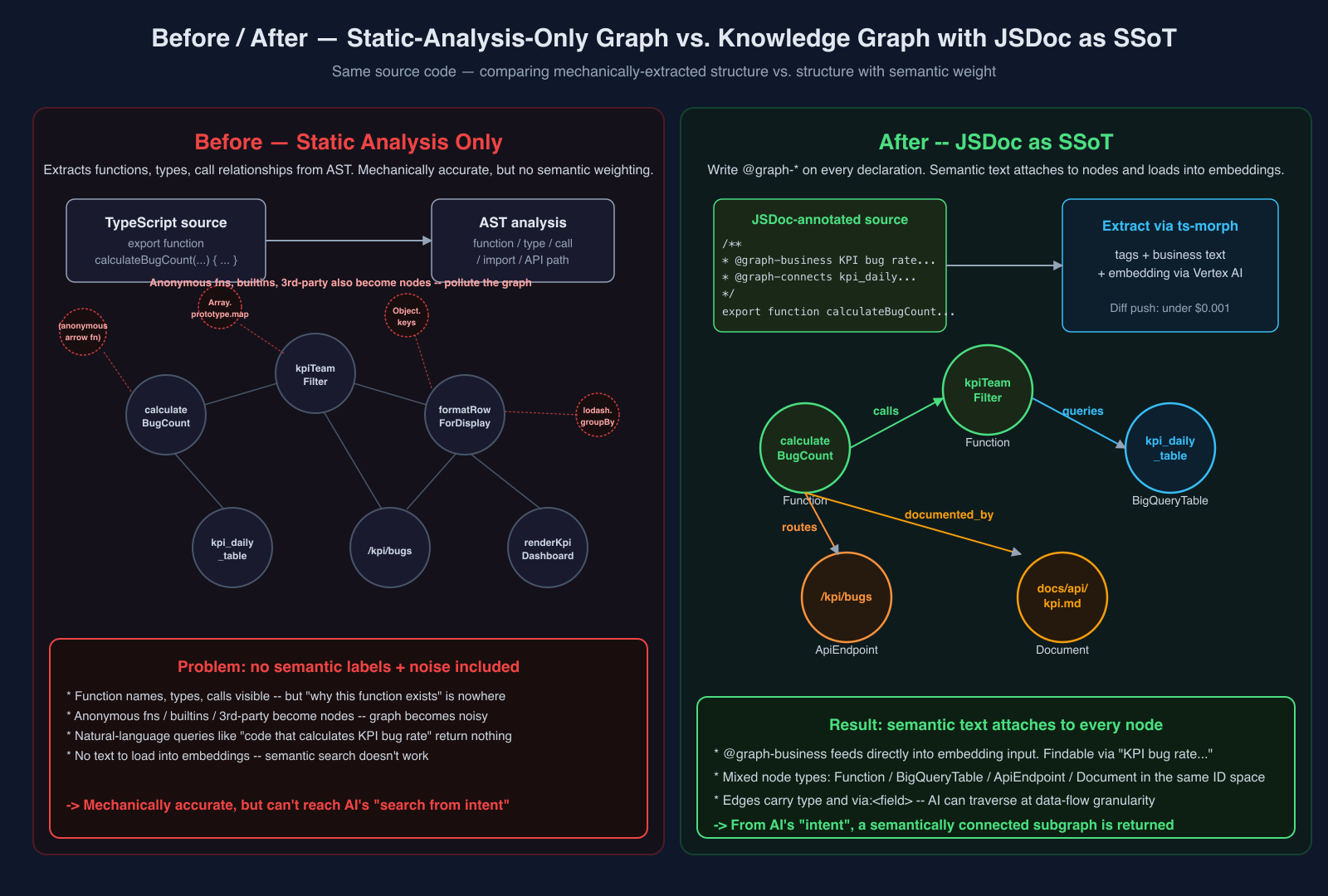
Here's a concrete example of the tags (from cpg's own source):
/**
 * Set embeddings on nodes in place.
 * Compares textForEmbedding against existing BQ data; only re-generates
 * for nodes where the text has changed.
 *
 * @graph-stack product-graph
 * @graph-domain Engineering
 * @graph-business Compares hash of textForEmbedding against existing BQ nodes; re-generates
 *   embedding only for nodes where text has changed. Unchanged nodes reuse BQ embeddings.
 * @graph-connects cortex.product_graph_nodes [queries, via:id] read existing embeddings
 * @graph-connects vertex-ai-embedding [calls] generate embeddings for changed nodes
 */
export async function generateEmbeddings(
  nodes: ProductGraphNode[],
  options: { force?: boolean } = {},
): Promise<void> { ... }
What each tag does:
| Tag | Role |
|---|---|
@graph-node |
Explicitly declares node type (defaults to Function) |
@graph-stack |
The infra stack this declaration belongs to |
@graph-domain |
Business domain (comma-separated, multiple allowed) |
@graph-business |
What this declaration specifically does — the body of the embedding input |
@graph-connects |
Connection targets (multiple allowed; via: for parameter-level tracking; none to explicitly declare no connections) |
The key is that @graph-business feeds directly into the embedding input. It's not the node name — it's a natural-language sentence that carries semantic weight into search. In practice, almost all of these sentences are written by AI: during the normal flow of writing code in cortex, the AI writes the JSDoc alongside the code (and thanks to the ESLint enforcement below, it doesn't forget).
Making Omissions Physically Impossible
This design collapses the moment someone leaves a tag out. One function without @graph-business = that function is invisible to semantic search. One without @graph-connects = the data flow through that function is absent from the graph.
So we built enforcement that makes omissions physically impossible:
- 5 ESLint plugins — tag presence validation, syntax validation, naming convention enforcement (stack / domain allowlists),
@graph-connectsrequired,@graph-connects nonemisuse detection (flags whennoneappears on code that calls external services) - Automated PR review (Part 1 ③) — tags missing are flagged as
[Graph] Critical; docs inconsistency is flagged as[Doc] Critical
The result: "write a declaration → business context is always written with it" holds as an invariant. Add a function → its meaning and connections are necessarily in its JSDoc.
One honest note: forcing "5 JSDoc tags on every declaration" on humans would blow up in code review within three days. Writing a @graph-business sentence per function, enumerating @graph-connects exhaustively, checking the naming allowlists — that's genuinely tedious at scale.
This works because AI writes the code. Writing four required JSDoc tags (plus optional @graph-node when the default Function type isn't enough) is rounding error on top of writing the code itself. With ESLint and automated review in the feedback loop, the AI doesn't miss tags — and human reviewers only need to check "is this tag factually correct?" not "is it there?"
Where Hallucination Happens Shifts
Viewed from another angle, what's going on here is that the location of hallucination shifts. Where you contain hallucination is, I think, fundamental to AI harness design.
As I wrote elsewhere, when you combine AI with a graph system, "hallucination doesn't disappear — it just changes location." For cpg, here's where it lands:
- Graph build / query phase: No fresh LLM generation. Once reviewed metadata lands in the graph, the ts-morph AST pass, the BigQuery MERGE, and the MCP query responses are all deterministic.
- JSDoc writing phase: This is the entry point for hallucination. Whether
@graph-businessis factually accurate, or whether@graph-connectsis exhaustively listed — these can go wrong since the AI is writing them.
But the entry point is locked down by automated PR review. Missing tags get [Graph] Critical; factual drift gets [Doc] Critical. When something's wrong, either the AI that wrote the code or another reviewer AI catches it and fixes it.
The result: once data lands in the graph, it can be treated as deterministically sourced from reviewed code, not as a fresh generated answer that might hallucinate on every query. AI agents calling cpg don't have to guard against "this might be a generated lie" on every returned node or edge. The tools can be designed as "return facts only" without compromise.
Build — AST to Graph via ts-morph
Once JSDoc is established as the SSoT, the rest is mechanics: extract it and assemble the graph. The implementation:
- AST-analyze JS/TS with ts-morph — walk every declaration (function / class / method / type / enum / variable / expression statement /
export default/ etc.) - Extract
@graph-*tags from JSDoc — collect the four required tags plus optional@graph-nodeand normalize into aParsedGraphTagsstructure - Generate nodes — use
qualifiedName = "<filePath>:<name>"as the node ID - Generate edges — one edge per
@graph-connectsentry, withvia:/cardinalityand other metadata preserved - Generate embeddings — send
@graph-businesstext to Vertex AI Embedding (gemini-embedding-2) and vectorize it - Load into BigQuery — MERGE all nodes / edges into
cortex.product_graph_nodes/cortex.product_graph_edges
Because @graph-business goes directly into the embedding input, querying "code that calculates the KPI bug rate" in natural language returns a hit based on semantic proximity of the description — even when the function name contains neither "bug" nor "rate."
The overall flow: the three tracks (apps/ / infra/ / docs/) each go through their own parser, are merged into a single node set by the generator, and only nodes whose text has changed are sent to Vertex AI before being stored in BigQuery:
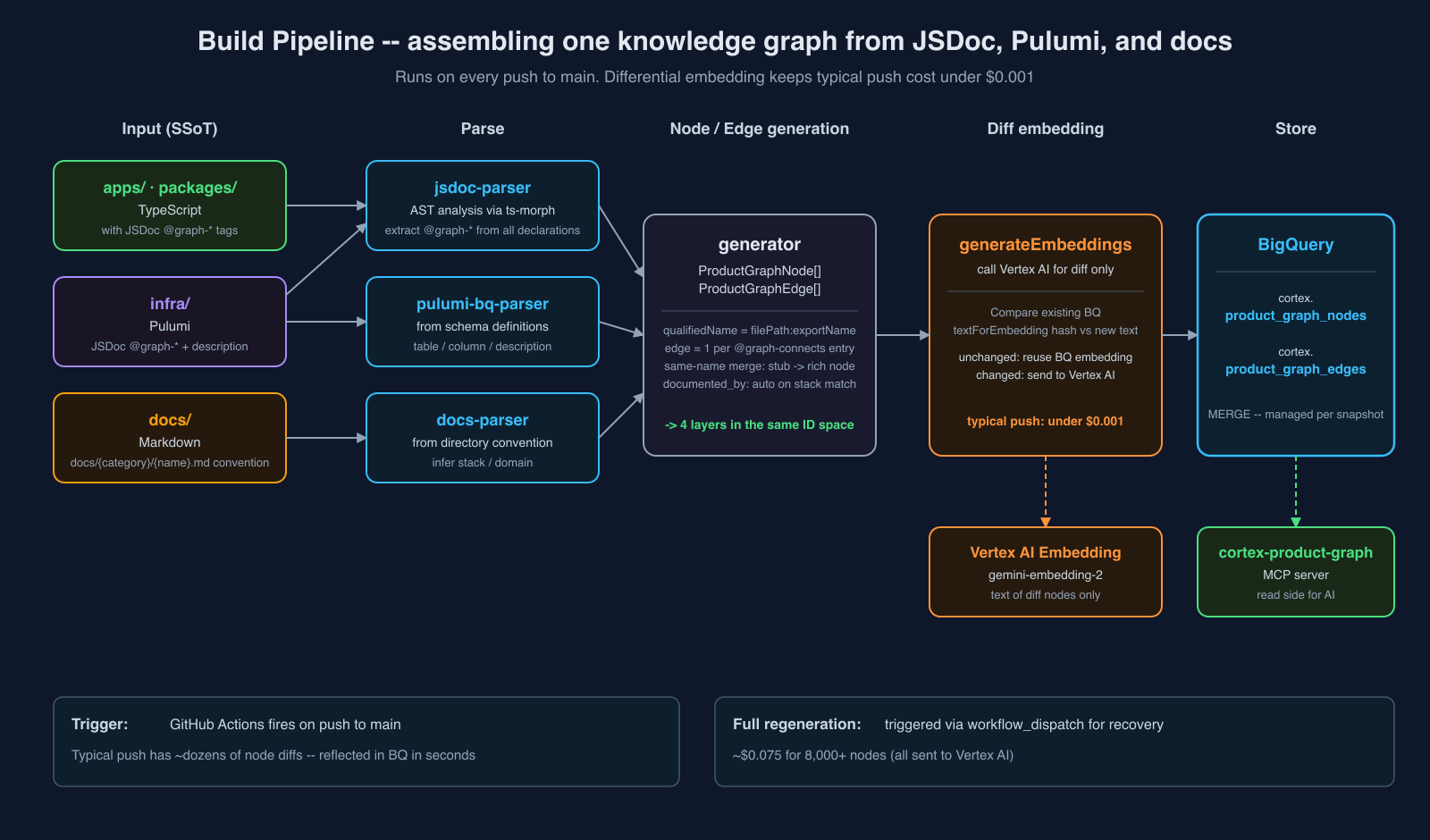
Build Cost Is Effectively Zero
The build runs automatically on push to main via GitHub Actions, using a differential embedding approach:
- Compare
textForEmbeddingof each BQ node against the new text - Unchanged nodes reuse their existing BQ embeddings
- Only changed nodes go to Vertex AI
A typical push changes a few dozen nodes, so cost is under $0.001. Full regeneration (for recovery, triggered via workflow_dispatch) is ~$0.075 for 8,000+ nodes.
Why BigQuery, Not a Graph Database
When people hear "knowledge graph," they often imagine a dedicated graph DB (Neo4j, Neptune, Memgraph, etc.). cortex runs on just two BigQuery tables (product_graph_nodes / product_graph_edges). Three reasons:
- Different cost structure — dedicated graph DBs set a floor of "always-on cluster cost"; for the current implementation, BQ is storage + on-demand queries only. Even with continuous AI traffic, it's clearly cheaper than running a server 24/7.
- Vector search / cosine similarity / SQL in the same place — BQ has
VECTOR_SEARCHandML.DISTANCE, so semantic search over@graph-businessembeddings, filter by node properties, and adjacent-node JOINs can all live in one query. That matters when "semantic search + property filter + neighbor JOIN" is the standard access pattern. - Migration-ready for GQL once BQ Graph goes GA — BQ already has Graph in BigQuery in Preview; once it ships GA, you can put a graph view over the existing tables and likely shift to
MATCH (n)-[e]->(m)queries in GQL. The current table design is already migration-ready.
In short: get the graph DB's future strength (GQL) while running on plain BQ tables today. Compared to adding a graph DB on top of a generic RAG stack (pgvector / Pinecone / etc.), fewer systems to operate and lower learning curve.
The Core Part Is Available as an Open-Source Sample
The "parse JSDoc annotations with AST analysis and output a graph" part is small enough to reproduce cleanly, so I published it as a working sample:
It's a ~500-line library that extracts @graph-* and outputs ndjson of { kind: "node", ... } / { kind: "edge", ... } objects. Comes with a pnpm run example that runs end-to-end. For those who just want to see the output format without cloning, the built ndjson is checked in: examples/sample/output.ndjson.
This is intentionally just the "turn code into a graph" part. The real value in cortex starts when docs and DB schemas land on the same graph — that's the next section.
Connections — Landing Docs and DB on the Same Graph
Looking at the sample ndjson, a @graph-connects users [reads_from, via:id] entry has users stored as a raw string in targetId. Leaving that as-is means it's just a string. Resolving users into a rich node carrying column definitions, partition info, and per-column descriptions — that's where the resolution power of search takes a real step forward.
cortex does this in three directions.
1. DB Schemas as Nodes in the Same Graph
cpg ingests not just code but cortex's DB schemas in the same build. A @graph-connects users [queries, via:id] on the code side gets resolved at build time into a rich Table node carrying column definitions, partition metadata, and descriptions (if the same-named stub exists, its internals are replaced while its ID and all inbound edges survive).
The key point: table and column descriptions aren't AI-generated annotations attached after the fact — they're pulled directly from the description fields in the Pulumi schema definitions. Here's what that looks like (excerpt from cpg's own table definition):
export const productGraphNodesTable = new gcp.bigquery.Table('cortex-prod-product-graph-nodes', {
  datasetId: 'cortex',
  tableId: 'product_graph_nodes',
  description:
    'Product Graph nodes — unified knowledge graph of code + DB + docs. ' +
    'Auto-generated from JSDoc @graph-* tags',
  schema: JSON.stringify([
    { name: 'id', type: 'STRING', mode: 'REQUIRED',
      description: 'Unique node ID (graphId:nodeType:filePath:name format)' },
    { name: 'nodeType', type: 'STRING', mode: 'REQUIRED',
      description: 'Node type — ApiEndpoint, BigQueryTable, Function, Module, Document, etc.' },
    { name: 'qualifiedName', type: 'STRING',
      description: 'Fully qualified name — filePath:exportName format' },
    // ...
  ]),
});
Both the table-level and column-level descriptions become the embedding input for semantic search directly from the Pulumi definition. The same philosophy as cpg's JSDoc — "write the description at the place the thing is defined" — runs all the way through the DB layer. Fix a Pulumi description → semantic search improves. Same mechanics as fixing a JSDoc.
2. Docs Auto-Promoted to Nodes via Directory Convention
Markdown files under docs/ also land in the graph. The mechanism is simple: the directory structure is conventionalized so that which stack and domain each doc belongs to is deterministically resolvable:
docs/{category}/{name}.mdExamples from cpg itself:
docs/product-graph/README.md→ stack:product-graph, domain:Engineeringdocs/code-graph/README.md→ stack:code-graph, domain:Engineeringdocs/mcp/db-graph/README.md→ stack:mcp-db-graph-server, domain:Engineering
Each file is ingested as a Document node in the graph, and a documented_by edge is auto-generated from code nodes whose @graph-stack matches the doc's stack. Code under apps/graph/product/ all carries @graph-stack product-graph, so it's automatically linked to docs/product-graph/README.md. Change code → related docs are already linked.
This means an AI reviewer can answer "did this code change leave related docs stale?" in one graph hop (that's the source of the [Doc] Critical comments from Part 1).
3. Infrastructure Definitions as Nodes
@graph-* tags go on Pulumi code in infra/ too. An example from cortex's own graph infrastructure:
/**
 * @graph-node {CronSchedule}
 * @graph-stack code-graph
 * @graph-domain Engineering
 * @graph-business graph-boundary-daily: runs cross-repository boundary analysis at 7:00 AM JST
 *   daily (auto-detecting API, DB, and Event connections across repos)
 * @graph-connects graph-index-job [triggers] trigger Cloud Run Job
 */
new gcp.cloudscheduler.Job(`${prefix}-graph-boundary-schedule`, { ... });
This becomes a CronSchedule node in the graph, connected to the target CloudRunJob node by a triggers edge. The Pulumi definition is itself a graph entry point — "what code runs in this cron?" is now answerable by graph traversal.
Result: Four Layers on One Graph
Adding the three together, the node types in the graph look like this:
| Node type | Source |
|---|---|
| Function / Class / Method | Code (JSDoc) |
| ApiEndpoint / Page | Code (JSDoc @graph-node) |
| BigQueryTable / FirestoreCollection (stub) | Code @graph-connects targets |
| Table / Column / Schema (rich) | Schema files defined in Pulumi |
| Document | Directory parser over docs/ |
| CronSchedule / PubSubTopic / CloudRunService | infra/ JSDoc |
Edge types correspondingly:
| Edge type | Role |
|---|---|
| calls / queries / reads_from / writes_to / publishes / triggers | code → other nodes (@graph-connects) |
| documented_by | code → Document (auto-generated on stack match) |
| HAS_TABLE / HAS_COLUMN | Schema → Table → Column (DB side) |
| shares_topic | Between boundary nodes sharing a topic |
Code ↔ DB ↔ docs ↔ infra — all reachable in one hop on the same graph. This is what "Product Graph" means: cortex's unified knowledge graph.
Here's an actual visualization of a slice of cpg itself. Starting from generateEmbeddings (code), you can see cortex.product_graph_nodes (BigQueryTable) with its columns, the Pulumi table definition resource, docs/product-graph/README.md, external services like Vertex AI, and a separate layer's graph-boundary-daily (CronSchedule) — all connected by edges on the same node set:
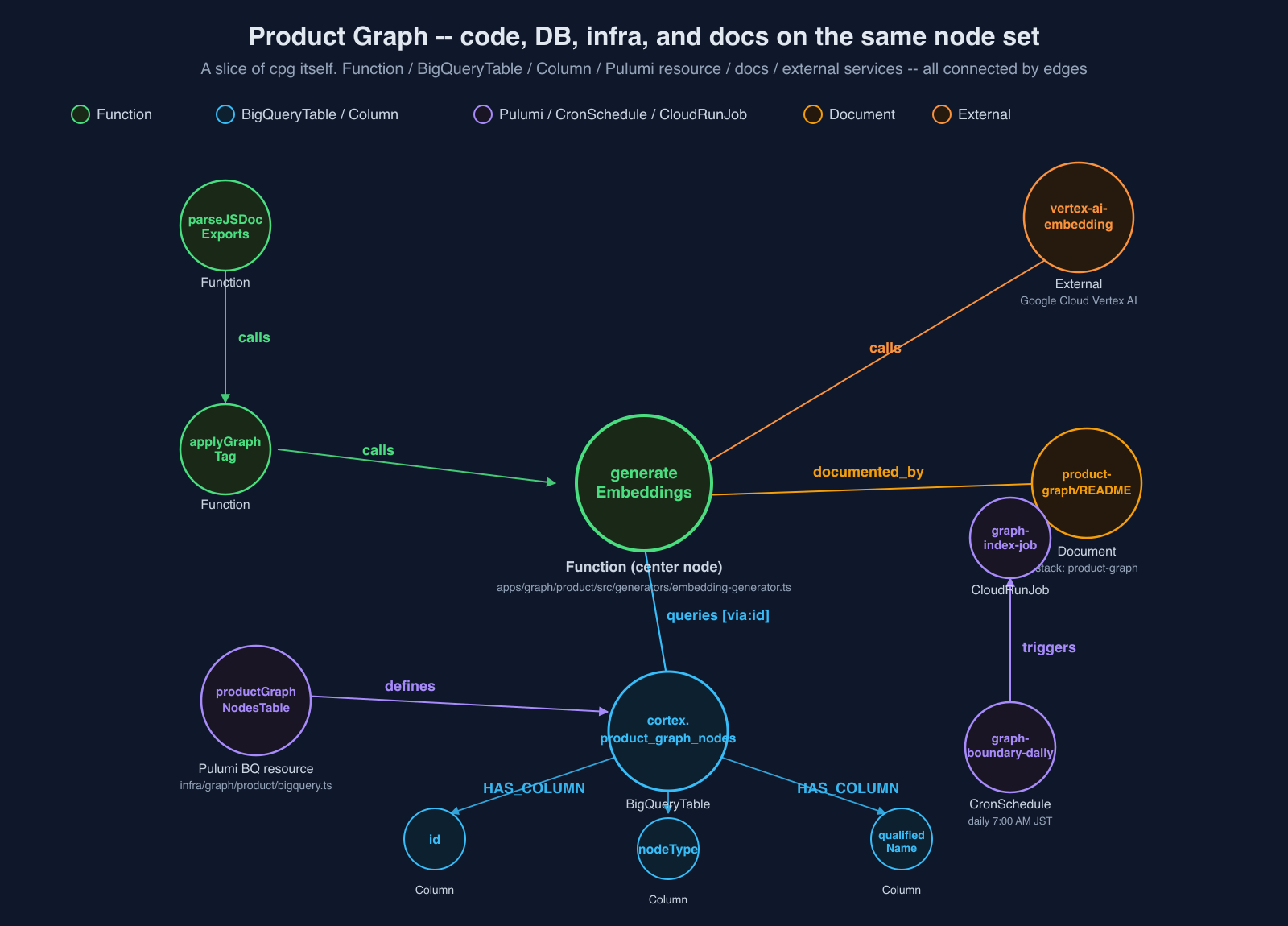
Where the Sample Stops
graph-jsdoc-extractor intentionally leaves out:
- Resolving
@graph-connectstargets to real node IDs (cortex uses a seven-stage resolver; the rules are project-specific) - Same-name merging (cortex promotes DB-schema-side rich nodes to replace stubs; the merge source is project-specific)
- The docs directory convention parser (cortex's
docs/{category}/{name}.mdconvention is cortex-specific) - Embedding generation (Vertex AI setup is up to you)
These are parts where the right answer differs per project — naming conventions, where docs live, which embedding model to use, when to promote a stub to a rich node. Baking one answer into the sample library would make it harder to use, not easier. The sample draws the line at JSDoc → graph structure, and this article's job is "here's how we did it in cortex — translate it to your project's context."
MCP Tool Design and the Runbook Pattern
The graph is now assembled. Next: how AI uses it.
cpg runs as an MCP server (cortex-product-graph). From the AI's side, three tools are visible, applying the three-layer tool design (search / detail / traverse) from the Agentic Graph RAG MCP post directly to cpg:
| Tool | Role |
|---|---|
search_product_graph_nodes |
Find entry points (vector search + name search) |
get_product_graph_node_detail |
Deterministically fetch detail by ID |
trace_product_graph_connections |
BFS subgraph traversal (via_filter for parameter-level tracking) |
Three layers only shows you what's in the graph. For jumping from graph nodes to the actual data they point to, supplementary tools live in the same MCP:
| Supplementary tool | Role |
|---|---|
read_file |
Pass a node's path property directly to fetch source (Function / Class / Method / ApiEndpoint / Document — any code-origin node carries path) |
grep_code |
Pattern search across the repository |
git_blame |
Last author, commit, and timestamp per line |
query_product_graph_bq |
Direct SQL against BigQuery. Find a BQTable node in the graph, then jump to its live data (executed via user OAuth, so BQ IAM applies as-is) |
read_firestore / write_firestore |
Read/write Firestore collections. Find a FirestoreCollection node in the graph, then go to the live documents (Firestore access follows the same user / environment permission boundary; cpg provides the entry point, not a bypass around IAM) |
list_product_graph_stacks / list_product_graph_domains |
Lists all stack / domain names present in the graph; useful for orienting before a search |
In other words, cpg's MCP is a two-tier design: the three-layer structure for graph traversal + supplementary tools for descending into live data (source code / BQ / Firestore). The AI can do "search by meaning → traverse by structure → pull live data" entirely within one MCP server.
Runbook Pattern — Return Values Contain the Next Action
Every MCP response ends with a "related nodes (next action candidates)" block. For example, after a search returns:
3 nodes found:
- apps/generator/kpi/src/kpi-calculator.ts:calculateBugCount (Function)
- backlog_no_embedding.kpi_bug_rate_per_100pt (BigQueryTable)
- /kpi/bugs (ApiEndpoint)

## Related nodes (next action candidates)

### 🛠 Code (1)
- apps/generator/kpi/src/kpi-calculator.ts:calculateBugCount
  → `get_product_graph_node_detail("apps/generator/kpi/src/kpi-calculator.ts:calculateBugCount")`

### 🗄 DB tables (1)
- backlog_no_embedding.kpi_bug_rate_per_100pt
  → `trace_product_graph_connections(start_node: "backlog_no_embedding.kpi_bug_rate_per_100pt", direction: "backward")`

### 🌐 API (1)
- /kpi/bugs
  → `get_product_graph_node_detail("/kpi/bugs")`
Copy-pasteable tool calls are lined up by node type, showing exactly what to call next. The AI gets new options on every call, so it never has to figure out "what should I do now?"
Here's the AI ↔ MCP loop in diagram form. The MCP bundles next action candidates into every search response; the AI picks one and makes the next call, repeating:
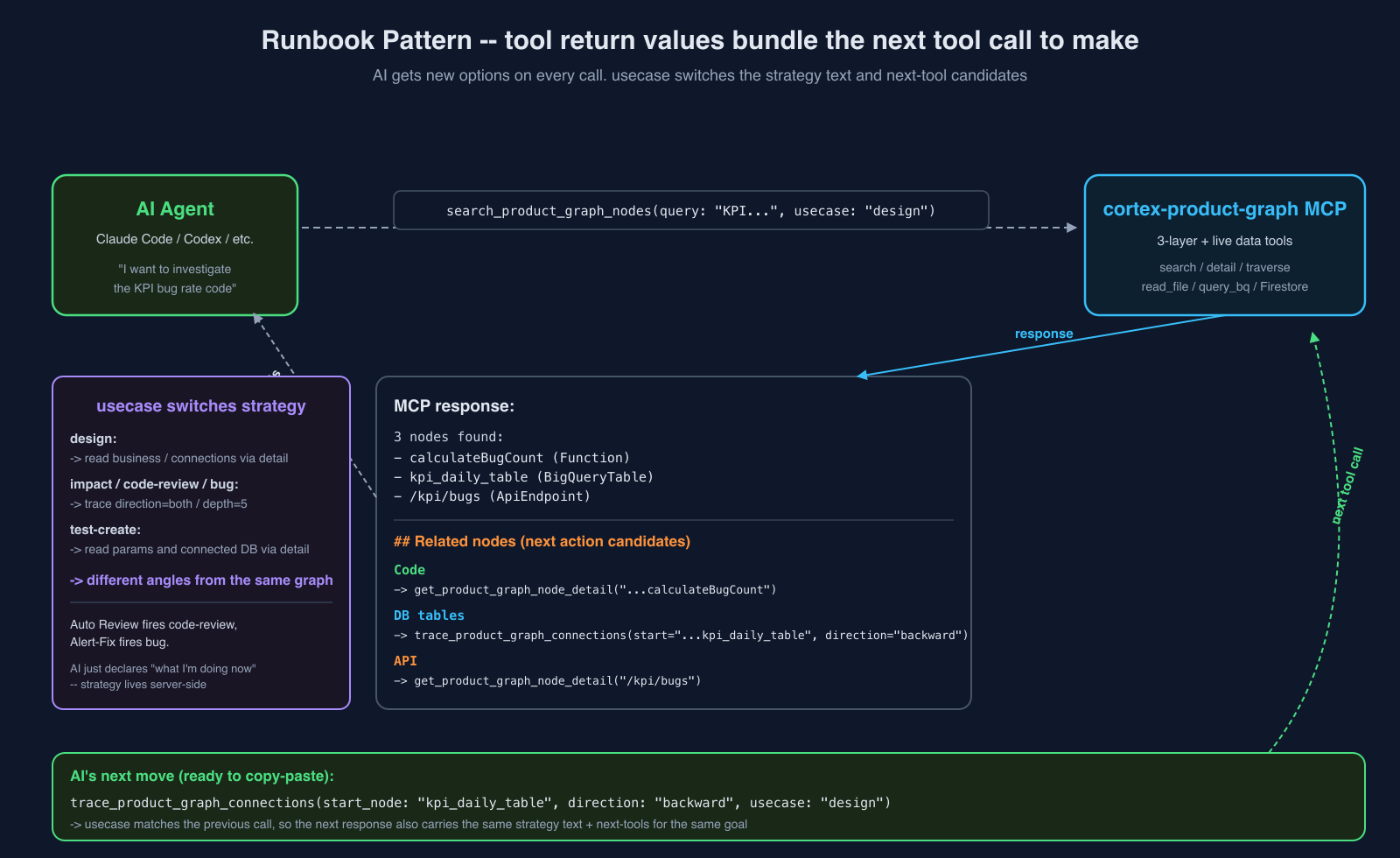
usecase Parameter — Switching the Runbook
Every tool accepts a usecase parameter where the AI declares what kind of investigation it's doing:
| usecase | Strategy (summary of what cpg optimizes for) |
|---|---|
general |
Basic investigation with unknown entry point. Default. |
design |
Understanding existing feature structure. Read business / connections via get_product_graph_node_detail. Deep trace is unnecessary; Document nodes take priority. |
impact |
Trace upstream and downstream impact deeply. Hit trace_product_graph_connections with direction=both / max_depth=5. Code + DB + infra + schedules are all on the same graph, so one traversal covers a wide area. |
test-create |
Test design. Fetch detail to read parameters and connected DB / called functions. |
test-review |
Compare existing tests against implementation coverage. Cross-check branch structure of target Function / Method against test case count. |
code-review |
Check impact of changes and detect @graph-business violations. Trace impact → detail to check business / source. |
bug |
Deep trace from error origin. direction=both / max_depth=5 for upstream callers + downstream data flow. |
The same search_product_graph_nodes call with usecase: "code-review" returns next action candidates optimized for "verify the change's impact first." With usecase: "bug" it returns candidates optimized for "trace deep from error origin + fetch logs." The Runbook switches to match the declared intent.
This matters because having the AI declare "what kind of investigation I'm doing" yields different angles from the same graph. Auto Review internally fires with code-review; Self-Healing fires with bug — the flywheel elements from Part 1 each run a different Runbook.
CLAUDE.md Convention — Forcing AI to Always Hit cpg First
Throughout this post I've said "the AI uses cpg," but AI doesn't spontaneously choose cpg. Claude Code defaults to grep / glob / file read as its first instinct. To flip that, the root CLAUDE.md in cortex opens with:
Product Graph MCP (cortex-product-graph)
This is the single most important asset in this repository. cortex-product-graph MCP indexes all code, DB schemas, docs, and infra into a unified knowledge graph with business context. It knows everything about this repository.
- Always query Product Graph MCP first before grep/glob/file reads. It returns richer, contextualized results.
- If Product Graph MCP is unavailable (auth expired, server down) and you are NOT in autonomous/auto mode, stop all work immediately and ask the user to authenticate. Do not proceed with degraded grep-only investigation.
Two things matter here. First, the explicit ordering — "cpg first, grep only as fallback." Second, fallback to grep is explicitly forbidden if cpg is unavailable. Without that second clause, the AI happily degrades to "cpg seems down, I'll just grep" and proceeds with stale context and wrong assumptions. With it, cpg unavailability is a hard stop, not a graceful degradation.
One clause in CLAUDE.md, and Claude Code's first move on any code investigation is pinned to cpg. Article writing, Auto Review, Self-Healing — all follow the same convention, so the entry point is always unified.
A Live Example — Investigating cpg with cpg
Enough abstraction. Let me walk through a real cpg query: using cpg to investigate cpg's own builder core — the meta-example.
Step 1: Semantic search for "the code that extracts graph source data from code annotations"
No function name assumed. Just the intent in plain language:
search_product_graph_nodes(
  query: "code that extracts graph source data from annotations written in code",
  search_mode: "semantic",
  usecase: "design"
)
Top 5 results:
- apps/graph/product/src/parsers/jsdoc-parser.ts:applyGraphTag (Function)
- apps/graph/product/src/parsers/jsdoc-parser.ts:extractTagsFromNode (Function)
- packages/eslint-plugin-graph/src/utils/jsdoc-utils.ts:extractGraphTags (Function)
- apps/graph/product/src/parsers/jsdoc-parser.ts:parseJSDocExports (Function)
- packages/eslint-plugin-graph/src/utils/jsdoc-utils.ts:getGraphTagValue (Function)
The query contained neither "JSDoc" nor "@graph-*" nor "parser" — yet the intent found the right nodes via the @graph-business embedding. grep cannot do this.
Step 2: Trace downstream from that node (usecase: "design" prioritizes Documents)
trace_product_graph_connections(
  start_node: "apps/graph/product/src/parsers/jsdoc-parser.ts:parseJSDocExports",
  direction: "forward",
  usecase: "design"
)
Edges returned:
- parseJSDocExports --calls--> extractDeclarationsFromFile
- parseJSDocExports --calls--> extractTagsFromNode
- parseJSDocExports --reads_from[via:filePath]--> filesystem
- parseJSDocExports --documented_by--> docs/product-graph/README.md (Document)
The last one — documented_by — is the point: the edge from code to the Document node was auto-generated. Following it with read_file retrieves docs/product-graph/README.md — and with it, the background, design rationale, and tag specification for this implementation, all in one hop.
Step 3: The meta-structure — this article itself is written with cpg
This article was drafted by Claude Code, not by me — I provided direction and review. That Claude Code has cpg MCP connected, so every time I said "show a real example from cpg's own code" or "use a cpg-related infra example," Claude queried cpg to pull actual function names, JSDoc, Pulumi definitions, and docs structure, then embedded them in the text.
In other words: the generateEmbeddings JSDoc, the Pulumi productGraphNodesTable description, the graph-boundary-daily cron annotation, the auto-link to docs/product-graph/README.md — none of these came from my memory. Claude queried cpg and found the real artifacts. My role is only the review judgment: "this is right / this is wrong."
This is the pattern repeating across all of cortex. Humans set the direction; AI uses cpg to verify and generate implementations / text / reviews. Part 1's ③ Auto Review and ④ Self-Healing run on the same structure. Article writing isn't a special case — as long as cpg exists, AI-driven work always takes this shape.
What Changed / Bridge to Part 3
That covers the inside of cpg. A closing summary of how it affects cortex as a whole:
1. I stopped running grep
Without knowing file names or symbol names, I can get the relevant code back by just describing what I want to do. The combination of 120+ apps and a team of one works because of this, more than anything else.
2. Auto Review produces context-grounded comments
The [Graph] / [Impact] / [Doc] / [Security] level comments Part 1's ③ Auto Review produces all stand on cpg. The substance is review carried out with the entire codebase as context — that's the real benefit of the cpg integration.
3. Self-Healing can trace from error origin to root cause
Part 1's ④ Self-Healing can hop from a Grafana alert → code → dependent tables → related docs in one graph traversal because cpg exists. It fires with usecase: "bug" and takes the shortest path from error to root cause.
4. The static-analysis code graph is working somewhere else
I said "we abandoned code inference" at the top, but that was specifically for cortex itself. For the external-facing production repositories (the core of the business), a different approach supplies context, and static analysis continues to run there. More on that in a separate post.
Most AI coding setups try to make the AI better at reading an unchanged repository. cpg takes the opposite approach: change the repository's information structure so AI has a first-class semantic map to read. That's the line between "another GraphRAG" and what cpg actually is.
In that sense, Product Graph is literally a knowledge graph of the AI, by the AI, for the AI: generated alongside AI-written code, maintained through AI review, and consumed by AI agents as their primary map of the product.
Coming up in Part 3 — automated PR review: the full pipeline of automated PR review built on top of cpg — from GitHub webhook ingestion through AI review / automated fix / automated merge / parallel deploy. What happens when Auto Review fires with usecase: "code-review", how [Graph] Critical comments are generated, and the worktree mechanism that lets AI apply fixes and push back.
comments (0)
no comments yet.