
Hi, I'm Ryan, CTO at airCloset.
Over my last few posts, I've introduced internal MCP servers we've been building: DB Graph MCP, the full picture of our 17 internal MCP servers, Biz Graph, and Sandbox MCP.
DB Graph is built from ORM parsing. Biz Graph extracts initiatives from meeting slides and uses a hand-designed Week node structure. Sandbox MCP is an app deployment platform. The purposes and implementations are completely different — but as I was writing each piece, I noticed that the design ideas at the root are the same.
This post is about that root. Agentic Graph RAG — a design frame we keep coming back to whenever we build graphs across different domains.
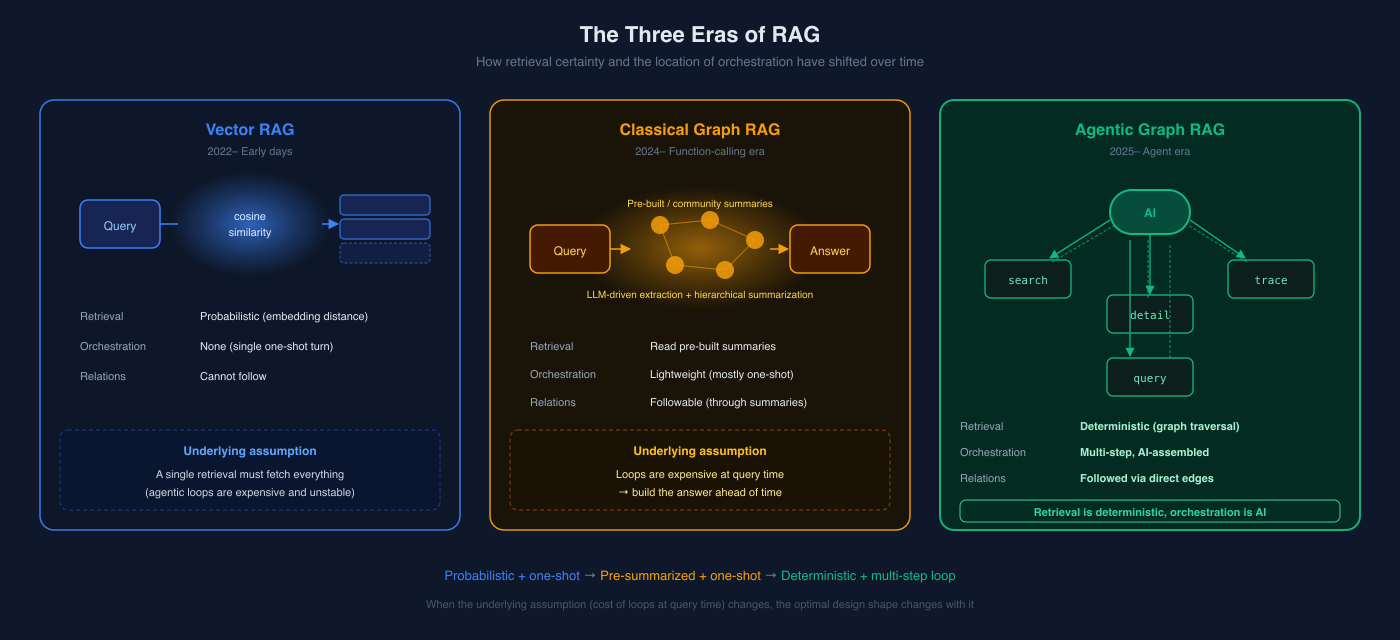
If you've heard "Graph RAG" before — maybe Microsoft's open-source project — wait a moment. The same words mean different things in the era when retrieval was assumed to be a single shot versus the era when AI agents are everywhere. The optimal design changes completely. This post is about the latter — a new way to think about Graph RAG in a world where Claude Code, Codex, and friends are doing the orchestration.
What Is RAG, Really?
Quick refresher. Skip if this is familiar.
RAG (Retrieval Augmented Generation) is the umbrella term for any technique that retrieves related information from external data and mixes it into the prompt before the LLM generates an answer.
Why was this needed? In the early days of generative AI — late 2022 and through 2023 — we ran into three problems:
- Tiny context windows: GPT-3.5 had 4K tokens, early GPT-4 had 8K. You couldn't fit your internal docs in there.
- Stale model knowledge: The model didn't know anything past its training cutoff. It certainly didn't know your internal data.
- Hallucination: It would confidently fabricate answers when it didn't know.
The RAG idea was: every time the user asks something, fetch the relevant chunks from external data and feed them in before generation.
Vector RAG — The First Practical Answer
The earliest RAG implementation that actually caught on was Vector RAG.
The recipe is simple:
- Split documents into small chunks (say, 500 tokens each)
- Embed each chunk with a model (e.g., 1536-dim vectors)
- Store them in a vector DB (Pinecone, Weaviate, pgvector...)
- Embed the user's question with the same model, retrieve the top-k closest by cosine similarity
- Stuff those chunks into the prompt and call the LLM
For its time, this was a great invention. Because:
- Search is fast: tens to hundreds of milliseconds
- No training needed: feed it docs, it's instantly searchable
- Domain-agnostic: works for legal documents, medical charts, internal wikis — the same machinery
- Rides model improvements: better embedding models, better recall
And critically, agent technology was still immature. OpenAI's Function Calling shipped in June 2023, was unstable for a while, and running a meaningful agentic loop of multiple tool calls was both slow and expensive. So RAG was designed around the assumption: one retrieval has to fetch everything you need. Vector RAG was perfectly tuned for this constraint.
The Limits of Vector RAG
But anyone who runs Vector RAG in production discovers the same thing fast: it can't follow relationships.
Take a question like:
"How did last month's SNS ad campaign affect new member signups?"
Vector search returns chunks that are textually similar to the question. The campaign description might come up. But:
- When was the campaign actually running?
- What were the new-member numbers during that same period?
- What happened with previous similar campaigns?
These aren't textual similarity — they're structural traversals across data. Embedding maps "spring SNS ads" and "spring promotion initiative" close together, but it cannot start from "ran from March 1 to March 31" and reach "new member counts in that same period". That's not a similarity problem; that's a join problem.
On top of that:
- Chunk boundaries kill context: related info gets split across chunks
- Top-k cliff: critical info at rank 11 is invisible
- Granularity mismatch: questions like "summarize the whole thing" can't be answered by collecting chunks
Vector RAG nailed "fetch text similar to the question in one step." It's weak at "follow data through structural relationships." That's the gap that Graph RAG was born to address.
Graph RAG — Search That Follows Relationships
The basic idea of Graph RAG: extract entities (people, organizations, concepts) and relationships (belongs-to, affects, references) from your documents, store them as a graph, and at query time traverse the graph to gather information across multiple hops.
This handles questions like our SNS-ads-and-new-members example — anything that requires multi-hop reasoning.
Classical Graph RAG — Built for the One-Shot Era
The most well-known implementation right now is Microsoft's GraphRAG, released in 2024. The papers are well-written and I have a lot of respect for it. But the design philosophy is squarely from the one-shot retrieval era.
Roughly, Microsoft GraphRAG does this:
- Entity extraction: feed the entire corpus through an LLM to extract entities and relationships
- Community detection: find graph clusters (communities) using the Leiden algorithm (a community detection method)
- Hierarchical summarization: have the LLM summarize each community. Then summarize groups of communities into higher-level summaries
- Query time: pick the relevant community for the user's question, dump its summary into the prompt, answer in a single shot
Why is the preprocessing this heavy? Because of the assumption underneath: "calling tools many times at query time isn't realistic". Function calling loops were slow, expensive, and unstable. So you preprocess the entire corpus with an LLM, build community summaries, and front-load the work to make query-time retrieval a single hop or two.
This wasn't a design failure — it was the rational answer for that era. LangChain's RetrievalQA, LlamaIndex's query engines — all of them were built on the same premise: "retrieval is single-shot, generation is one-turn."
What Classical Graph RAG Solved, and Didn't
What it solved:
- Relationship-aware search (community summaries even cover "the big picture")
- Multi-hop questions like "the relationship between Sam Altman, OpenAI, and Microsoft"
What it didn't solve cleanly:
- Construction is expensive: extracting entities from a large corpus via LLM costs real money
- Schema is at the LLM's mercy: the entities and relationships extracted are whatever the LLM thinks. This works fine for public-knowledge corpora (papers, news, etc.), but for domains that lean on internal tacit knowledge, the extracted units don't always match what's meaningful for the business
- Updates are heavy: every new document means recomputing communities
- Sometimes off-target: community summaries get over-abstracted, and the specific information you actually need falls out
Honest disclaimer: I haven't seriously run classical Graph RAG in production myself. By the time I started building graph-based MCPs in our company, Claude Code was already running on my laptop, and I started from a world where agents calling tools many times was the default. As a result, I never actually needed the heavy "compress the answer ahead of time" preprocessing of community summaries. If AI can re-fetch as many times as needed, the graph just has to hold the facts accurately.
The flip side: if I had been doing this in 2023, I likely would have ended up on the same path as community summaries. The problems classical Graph RAG was solving are real — the underlying assumptions just changed faster than the design.
Things Changed — The Agentic Era
From late 2024 through 2025, the landscape shifted:
- Production-grade agents arrived: Claude Code, OpenAI Codex — agents that can run long tasks while orchestrating their own tool calls
- MCP (Model Context Protocol) landed: tool descriptions became a standardized contract the model can read
- Tool-use accuracy from Sonnet/Opus-class models: "pick the right tool from 20" became reliable
- Long context windows + prompt caching: stacking many tool calls in a session is now economically reasonable
stop_reason: tool_useas a natural loop: the model itself decides "I have enough info" or "I need to look more"
When all of these line up, the assumption "we can't afford retrieval as a loop" no longer holds. Five tool calls per session, ten, twenty — that's now the norm.
The constraint Microsoft GraphRAG was designed against — "loops are expensive at query time" — has dissolved.
This isn't to say Microsoft GraphRAG is "outdated." It was the right answer for its constraints. The constraints just changed, and so does the optimal answer.
Agentic Graph RAG — Deterministic Retrieval, AI-Driven Orchestration
Here's the thesis. In one line:
Each retrieval step is deterministic. Only the orchestration is AI.
For context: "Agentic Graph RAG" isn't a term I coined. Neo4j's NODES AI 2026 featured a session titled "Agentic GraphRAG," and O'Reilly is publishing Agentic GraphRAG by Anthony Alcaraz and Sam Julien in November 2026. The industry as a whole is pivoting from "one-shot Graph RAG" toward "agent-driven Graph RAG." This article is my attempt to put words around the design we'd been arriving at independently inside our company.
That said, when "Agentic GraphRAG" is used in public contexts, the dominant framing centers on agents automating the graph construction itself (Neo4j's talk above is in that lineage). What this article takes from that broader idea is specifically the query-side agentic pattern. We still hand-design the graphs because the domains we target (internal DB schemas, initiatives × KPIs, codebases) lean heavily on internal tacit knowledge — for now, hand-designing produces better results in practice. We aren't rejecting auto-construction in principle; we're applying the query-side concept to graphs we still build by hand.
Vector RAG had probabilistic retrieval. Embedding cosine is an approximation, and it sometimes misses. Hallucination starts at the retrieval layer.
Classical Graph RAG runs retrieval once at query time. Heavy preprocessing prepares "the answer itself" in advance, and at query time you just look it up.
Agentic Graph RAG sits between these two.
- The graph is designed by humans. Our domains lean on internal tacit knowledge, so humans deciding "this is the granularity I want to slice the data with" produces better results.
- Each tool call is deterministic. Pass an ID and you get the connected nodes and edges. There's no embedding wiggle.
- The AI only judges which tool to call next, what ID to pass in, and when to stop.
The result: errors get localized. Retrieval itself is deterministic, so the only places to be wrong are "AI picked the wrong starting point" or "AI stopped too early." The data in the response is the truth.
Tool Return Values Become a Runbook
The most important design move in Agentic Graph RAG: the tool's return value tells the AI what to do next.
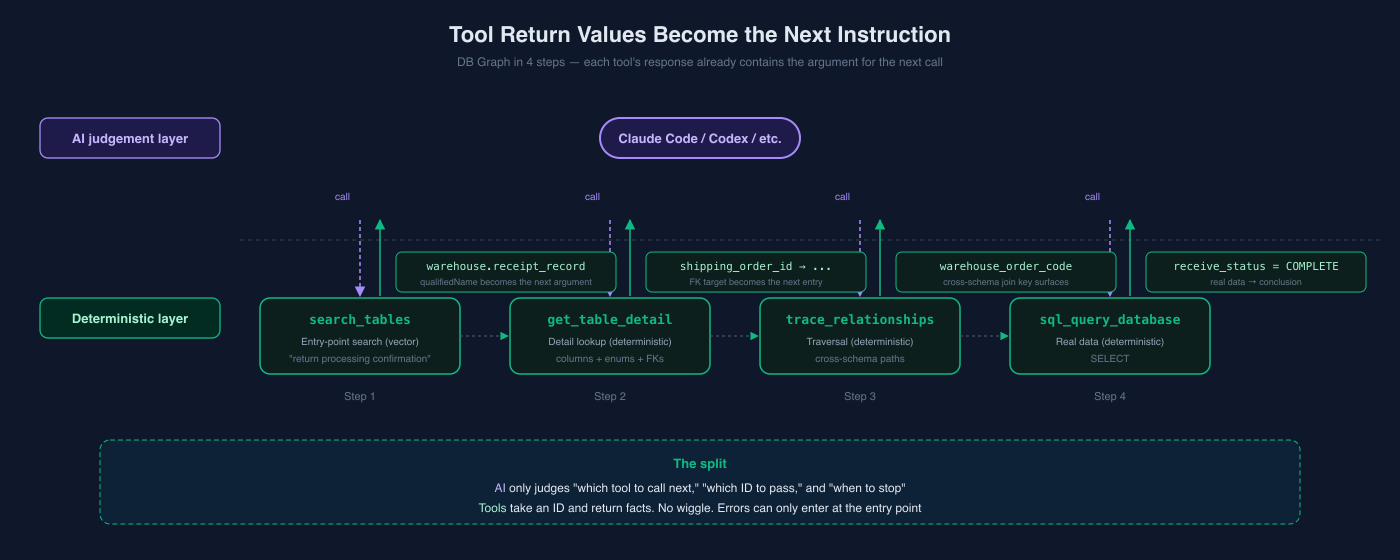
This is different from a regular API. Regular APIs answer the question they were asked. MCP tools are in conversation with an AI. The other side of the conversation needs not just an "answer" but candidates for the next move.
Concrete example.
When the AI calls DB Graph MCP's search_tables tool, it gets:
5 tables matched (vector similarity ranked):

warehouse.return_package_table (postgresql) (distance: 0.2557)
warehouse.receipt_record_table (postgresql) (distance: 0.2720)
inventory.receipt_confirmation_table (mysql) (distance: 0.2921)
warehouse.receipt_record_detail_table (postgresql) (distance: 0.2951)
app.return_status_change_history_table (mysql) (distance: 0.3170)
※ Schema and table names are anonymized — they map to internal system names.
Notice that the response itself contains the next tool's argument. The qualified name warehouse.receipt_record_table is exactly what get_table_detail(table_name: "warehouse.receipt_record_table") expects. If the AI decides "let me look at the details," it just copy-pastes.
The get_table_detail response is even more direct:
# warehouse.receipt_record_table
DB: POSTGRESQL / ORM: typeorm / Repo: warehouse-api

## Columns (9)
- id: int [PK, AI, NOT NULL]
- shipping_order_id: varchar [NOT NULL]
- status: enum [NOT NULL, default=IN_PROGRESS]
- ...

## References (2)
- shipping_order_id → warehouse.shipping_order_table.id (explicit)
- operator_id → warehouse.user_table.id (explicit)

## Enum / Status Definitions (2)
- Status: COMPLETE = received, IN_PROGRESS = in progress
- Type: RENTAL_RETURN = rental return, ...
This response implicitly tells the AI:
- "The meaning of
statusis in the Enum definition" → don't guess, read it - "There are FK references" → if needed, you can follow them with
trace_relationships - "There's no direct FK to the
appschema" → you'll need a different path
In other words, the tool's response is a runbook for the AI. The AI reads it and assembles the next move on its own.
Now look at the response from sql_query_database:
**app** (staging) — 1 row

| id     | status   | warehouse_order_code |
|--------|----------|----------------------|
| 98765  | RETURNED | SO-2026-00012345     |

> **Table**: Manages the full lifecycle of delivery orders...

### Column descriptions
- **status**: Delivery status (1=awaiting shipment, 2=ready, 3=delivered, 4=returned, ...)
- **warehouse_order_code**: Link code to the warehouse-side shipping order

### Related tables
- → **app.member_table** (user_id → id)
- → **app.plan_master** (plan_id → id)
- ← **app.order_history_table** (delivery_id → id)
Column descriptions and related tables are auto-attached below the query result. This is composed dynamically from the graph data we cached in BQ. Reading that "warehouse_order_code links to the warehouse side," the AI immediately decides "next, look up the warehouse table by this code."
Nobody had to tell the AI "now look at warehouse." The response itself is the instruction.
DB Graph in Action — A Production Investigation in 4 Steps
Here's the full flow (also shown in the DB Graph MCP article).
The scenario: a CS agent asks, "This member shows 'returned' in the app, but did the warehouse actually confirm receipt?"
Step 1: Find tables in natural language (vector-similarity entry-point search)
search_tables(query: "return processing confirmation", search_type: "semantic")
→ warehouse.receipt_record_table, warehouse.return_package_table, ...
Step 2: Look at the details (deterministic detail retrieval)
get_table_detail(table_name: "warehouse.receipt_record_table")
→ status=COMPLETE means "warehouse received it"
→ shipping_order_id connects to warehouse.shipping_order_table
Step 3: Find the path to the other schema (deterministic graph traversal)
trace_relationships(table_name: "warehouse.shipping_order_table", direction: "both")
→ from the app side, connection goes through an intermediate table
search_tables(query: "warehouse linkage")
→ app.warehouse_linkage_table (warehouse_order_code maps to warehouse.shipping_order.code)
Step 4: Verify against real data (deterministic query execution)
sql_query_database(database: "app", sql: "SELECT ... WHERE user_id=12345 AND status='RETURNED'")
→ warehouse_order_code = "SO-2026-00012345"

sql_query_database(database: "warehouse", sql: "SELECT ... WHERE code='SO-2026-00012345'")
→ receive_status = COMPLETE → confirmed by warehouse
The crucial part: the AI built this 4-step flow autonomously. The human only asked the original question. Each step's response carried "look here next" inside it, so the AI could keep composing the next call correctly.
And each step's retrieval is deterministic. The enum definitions for status in warehouse.receipt_record_table are facts pulled from the graph — not values the AI invented. warehouse_order_code = SO-2026-00012345 is real data — not an ID the AI fabricated.
This is a different experience from both Vector RAG and classical Graph RAG. Vector RAG is "return all the text in one shot," but hallucinations slip in. Classical Graph RAG is "return the community summary in one shot," but specifics get lost in summarization. Agentic Graph RAG is "fetch as many times as you need, but every fetch returns nothing but facts."
The Same Pattern, Across Many Graphs
This pattern — what we adopt: human-designed graph + deterministic retrieval tools + responses that double as AI runbooks — isn't limited to DB Graph and Biz Graph. We use it across many MCP servers internally.
Including the ones I mentioned by name in the 17 internal MCP servers post, the lineup looks like this:
| Graph | What it covers |
|---|---|
| DB Graph | 991 tables × 15 schemas across the company |
| Biz Graph | 5,000+ initiatives × 4,000+ KPIs |
| Code Graph | Functions, APIs, events across all repos |
| Cortex Product Graph | Code + DB + docs + infra unified for the cortex repo |
| Service Product Graph | API → DB dependencies per service |
The structures are all different. DB Graph from ORM parsing. Biz Graph from meeting-slide extraction plus hand-designed MetricDomain. Code Graph from static analysis. Product Graph from JSDoc annotations on top of everything else. Different sources, different assembly.
But the shape from the MCP-tool side is identical:
- Entry-point search: vector or substring to find "around here" (the only place fuzziness is allowed)
- Detail retrieval: pass an ID, get facts (deterministic)
- Relationship traversal: jump from ID to ID along edges (deterministic)
- Embed next-step hints in responses: related IDs, enum definitions, annotations, links
This 3+1 template is the universal Agentic Graph RAG shape. Different graph internally, identical surface. From the AI side, they all feel the same — Claude Code uses DB Graph and Code Graph and Product Graph with the same "search → drill down → traverse" rhythm.
Of the graphs above, only DB Graph and Biz Graph have dedicated deep-dive posts so far. Code Graph and the Product Graph family will get their own writeups; for this post, they're listed as fellow examples of the pattern.
A Designer's Checklist
For implementers. Below are the six things I always keep top of mind when adapting Agentic Graph RAG to a new domain.
Things I keep top of mind when building an Agentic Graph RAG:
1. Choose the graph-construction method based on the domain
If the domain leans on internal tacit knowledge, humans deciding the nodes and edges produces better results. Sometimes you intentionally design a structure that doesn't exist naturally — Biz Graph's "Week node" and "MetricDomain" are examples. The design is what determines quality.
Conversely, when the domain is mostly public knowledge (papers, news, public docs), having agents automate construction is a strong option (the Neo4j talk lineage). This article assumes the former.
2. Make retrieval deterministic
The entry-point search may use vector similarity (to accept natural-language queries). After that, "get details by ID" and "follow relationships from this ID" must always return definite values via graph traversal. Using similarity here lets hallucination back into the retrieval layer.
3. Tool granularity: search → detail → traverse
Don't pile everything into one giant tool. Split into search-style entry points, detail lookups, and traversal/data tools. The AI understands the difference and uses them appropriately.
4. Tool descriptions are AI runbooks
Write tool descriptions as execution guides for the AI, not human documentation. "If you see this kind of response, call this tool next." "In this situation, format the argument like this." As I mentioned in the Sandbox MCP post, this directly determines how smart the agent appears.
5. Embed "next move candidates" in responses
Don't just return data. Return:
- Related IDs: where to traverse next (FK targets, similar initiatives, parent commits)
- Enums and definitions: so the AI can interpret values without guessing
- Annotations and warnings: DEAD flags, deprecation marks, PII (personally identifiable information) redaction notes
At a granularity where the AI can read "this is what I should do next" out of the response.
6. Let the AI do the summarization
Don't pre-bake "community summaries" or similar on the server. The AI assembles facts case by case at the right granularity. Return facts. Let the AI interpret.
Limits and Caveats
Heads up. This approach has clear weak spots. If you're considering adopting it, read this section before you start designing.
Agentic Graph RAG is not a silver bullet. To be honest:
- Quality depends entirely on graph design. If the schema doesn't carve up the domain correctly, no number of tool calls will reach what you want. And in tacit-knowledge-heavy domains, the call about which nodes/edges to include is one only someone deeply familiar with the domain can make.
- If the agent picks the wrong entry, it falls into a deep hole. Miss at the first
search_*and the rest of the graph traversal goes sideways. Entry-point quality matters. - Cost is tool-call-count × context length. 10–20 tool calls per session add up tokens straightforwardly. Prompt caching and progress reporting via MCP help, but you have to keep an eye on it.
- Hallucination doesn't disappear — it relocates. From the retrieval layer to "entry point selection" and "stop judgment." But it's much narrower territory, so debugging and evals get easier.
The first item is the one designers should worry about most. In tacit-knowledge domains specifically, graphs aren't found — they're designed. I wrote this in the Biz Graph post too, and for these domains I don't think it can be overstated.
Summary
The three eras of RAG, in one table:
| Era | Representative | Retrieval | Orchestration |
|---|---|---|---|
| Early days | Vector RAG | Probabilistic (cosine) | None (one-shot) |
| Function-calling era | Classical Graph RAG | Pre-summarized | Light, mostly one-shot |
| Agent era | Agentic Graph RAG | Deterministic (graph traversal) | AI assembles in many steps |
Vector RAG made "search and dump some context" work. Classical Graph RAG packaged "follow relationships" into a single-shot lookup. Agentic Graph RAG separates "tools that return only facts, accurately" from "AI agents that orchestrate them in multiple steps."
The graphs we've built internally — DB Graph, Biz Graph, Code Graph, Product Graph family — they're all from the same lineage. The contents and construction differ, but in our domains they all share the same shape: "give Claude Code a human-designed graph through deterministic tools." Which is why, from the AI side, they all feel the same.
If you're building AI-native internal infrastructure, give this perspective a try. Don't hand the AI an answer. Hand it a map. It walks much further than you think.
And the quality of that map comes down to how deeply you understand the domain — at least for the domains where the relevant knowledge sits as tacit understanding inside people's heads. In those domains, the best AI systems are still built by the people who know the problem space best. Domain expertise hasn't lost value in the AI era — it's gained it. That's been my strongest takeaway from two years of building graphs across our company.
comments (11)
17 internal MCPs - what does routing look like when multiple graphs have overlapping context?
All 18 aren't loaded together (was 17 at the time of the post, grew by one since). Each MCP is scoped to a role or workflow. The CS-facing or operational ones are only active during specific scenarios like bug investigation, not in engineering review. Which subset activates is decided upfront by scenario / persona, not at query time. This pushes the "overlapping context" problem upstream: in any given scenario you've narrowed down to a few MCPs that don't conceptually overlap by construction. The dedupe question only shows up if you fan everything out at once, which the architecture avoids. When overlap does happen within a scenario, it's intentional lens difference. For code review you'd have Code Graph + Service Product Graph + DB Graph in play: the same "users" table shows up as schema in DB Graph, as call paths touching it in Code Graph, as service ownership in Service Product Graph. Same entity, three layers. The agent treats them as complementary. For cross-scenario pivots (jumping from a stacktrace mid-investigation to operational context for the affected user_id), canonical IDs flow across graphs (user_id, sku_id, initiative_id). No central registry or dedupe layer; the agent picks via tool descriptions.
persona/scenario gate as the routing mechanism is cleaner than I'd expect - deterministic beats query-time disambiguation every time. the edge I'd watch: when a bug investigation IS the engineering review. does your incident workflow stay single-persona, or have you needed an explicit rule for threads that span both?
Two entry points, persona set by where the thread starts. CS entry: investigation runs inside a CS-facing MCP. When something looks technical (real bug vs user error), an engineer makes the verdict. The persona bridge is a human handoff, not a routing rule. Engineer entry: Cortex Product Graph + observability MCPs (NewRelic, Grafana) for the joint structural + telemetry view. CS context comes in via canonical user_id when needed, not as a parallel persona. So the answer: single-persona by default, no explicit cross-persona routing rule. The bridge is human at the boundary. One thing worth adding: some MCPs take a usecase argument and reshape their tool responses based on it. Same tool, different output depending on whether you're in incident investigation vs feature planning vs review. This works as a runbook for the agent: the response itself tells it what to call next given the usecase. It's persona-scoping pushed inside the MCP rather than between MCPs.
the human handoff framing is clean — but worth naming what happens when that handoff fails silently. CS-facing MCP confident, engineer not looped in, nobody holds the full context. the Cortex graph angle is interesting — does that carry state across the entry point, or does each session start cold?
Honestly hasn't surfaced yet. Two things keeping it down so far: the setup is far from complete and bug volume hasn't stressed it, and team culture leans on direct communication. CS and engineering all sit in the office, day-to-day relationships are strong, no hesitation to ping someone when CS is uncertain. The "human bridge" relies on that culture more than on any technical guardrail. If we lose that, the silent-failure mode you describe is exactly what surfaces first. Thanks for naming it. On state across entry points: no agent-side write-back today, sessions start cold. Each one re-queries the graph and re-discovers. The graph is persistent but the session's findings don't flow back into it. Pulling past issues into the graph would close part of this. Issue history, resolution path, code change, and review verdict are all captured in GitHub PRs. That's an underused source of structured incident knowledge. To be exact, that's PR ingestion rather than session write-back since the records come from humans not the agent. But the practical effect overlaps: durable post-incident state the agent can pick up next time. Good direction to chase. Thanks for the angle.
co-location buys you more than the setup docs do. the gap shows first time someone's remote during an incident - worth naming that case even if it hasn't triggered yet
Fair. We haven't built for it. Naming the gap explicitly: remote-during-incident breaks the co-location bridge, no fallback protocol today. Worth tracking even before it triggers.
tracking before it triggers is the move - hardest to get buy-in on because the gap looks optional until it's already cost you.
The “join problem, not a similarity problem” framing is excellent. Vector RAG is great when the answer is near the wording of the question. But a lot of business questions are structural: what initiative affected which metric which table explains this customer state which process changed before the anomaly which owner/system/source is authoritative That is exactly where agentic retrieval starts to look less like search and more like controlled traversal. The agent needs tools that can move across relationships, but those tools need boundaries: approved graph edges, schema context, read-only defaults, row limits, and audit logs. For database-backed Graph RAG, I’d be careful not to expose the graph traversal as “anything Cypher/SQL can do.” The useful abstraction is often a named tool: find_related_metrics, trace_campaign_to_outcome, explain_table_lineage, etc. Related piece I wrote on why natural-language SQL needs schema context: https://conexor.io/blog/natural-language-sql-needs-schema-context?utm_source=devto&utm_medium=comment&utm_campaign=engagement Agentic Graph RAG feels strongest when the graph tells the model where it may walk — not just where it could walk.
That last line — "graph shows where the model may walk, not just where it could walk" — is doing real work. Agreed on named tools as the spine. But the calculus shifts at scale. 991 tables across 15 schemas, most useful queries joining 3-5 of them in different combinations. Even concept-level naming (trace_campaign_to_outcome, etc.) only covers the high-value paths; the long tail of cross-schema joins explodes combinatorially. Hand-building a tool per pattern just isn't realistic at this size. So our DB Graph stays hybrid: search_tables / get_table_detail / trace_relationships cover the 80%, with sql_query_database as a constrained escape hatch (read-only credentials, PII auto-redact, row limits). Named tools shape what the model thinks to do; audit logs catch what it actually did.