
Hi, I'm Ryan, CTO at airCloset.
In the previous series, code-graph deep dive (Part 2), I wrote about making a 46-repo codebase semantically searchable for AI. The final issue I left open in that piece was the absence of dynamic analysis:
What lives on the graph is the fact that "this edge exists statically." How often that edge actually gets used in production isn't recorded.
A graph that gives you static facts is one thing. Telling AI what's actually happening in production right now is a separate problem. So the same shaping discipline I applied to the static graph needs to apply to the observability stack too.
This post is the first half of that story. I split it into two: Part 1 (this post) covers how I shape four different monitoring surfaces (application / infrastructure / CI / LLM). Part 2 covers PII handling, the integration surface, and Self-Healing.
What Does "Observable to AI" Even Mean?
The biggest lesson from the code-graph series was: the data has to be shaped before AI can consume it. Throwing 46 repositories of source at a model blows past the context window and invites hallucination. So we shaped it — static analysis into a graph, boundary nodes given meaning, SAME_ENTITY joins between graphs — and only then handed it over.
The observability stack has the exact same problem. Throw raw production logs at AI and you get:
- Sheer log volume that drowns the context window
- No way for the model to tell errors from noise
- Metrics, logs, and traces that don't link to each other
- Questions like "what are we spending right now" that raw logs don't answer at all
In other words, logs have to be reshaped before AI can use them. Same problem, different domain.
The catch is that the right shape depends on what you want AI to answer. At cortex (the internal AI platform), I split the monitoring surface into four axes and let each one settle into its own form:
Note: "cortex" here refers to airCloset's internal AI platform codename. Unrelated to Snowflake Cortex, Palo Alto Networks Cortex, etc.
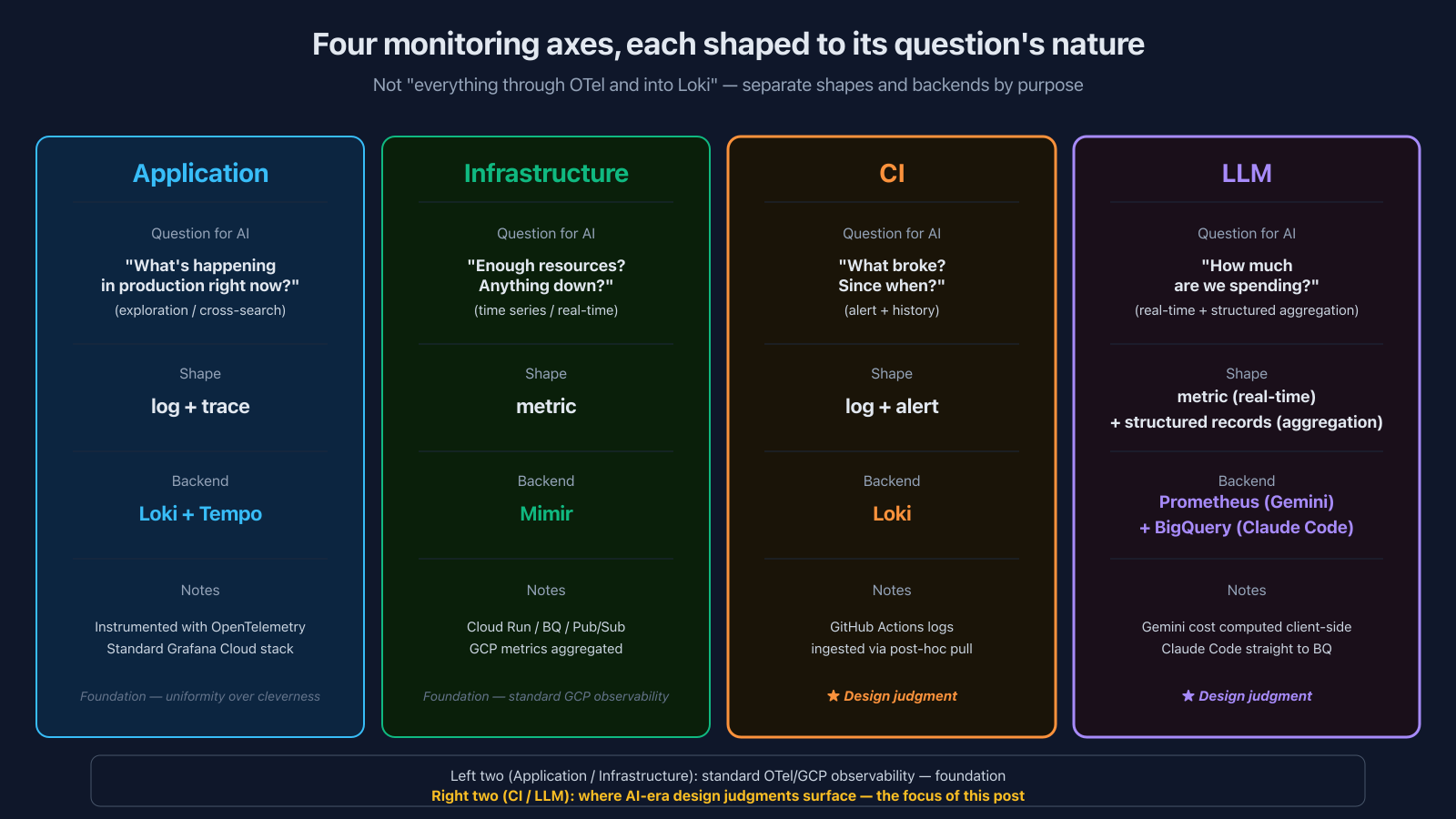
| Monitoring target | What you want AI to answer | Shape |
|---|---|---|
| Application | "What's happening in production right now?" (exploration) | log + trace |
| Infrastructure | "Do we have enough resources? Anything down?" (time series) | metric |
| CI | "What broke? Since when?" (alert + history) | log + alert |
| LLM | "How much are we spending? Who's using how much?" (real-time + structured aggregation) | metric + structured records |
"Just push everything through OTel and dump it all in Loki" is an option. But the moment you do, you're asking one backend to answer wildly different kinds of questions — real-time "what's spending right now" alongside "monthly cost broken down by team via SQL" — and one of them is going to suffer. Splitting by purpose is the choice I made.
Let me walk through each of the four axes. Application and infrastructure are the foundation, so I'll keep those brief. CI and LLM are where the AI-era design judgments actually surface, so I'll dig into those.
Application — OTel + Loki + Tempo, the Standard Stack
The foundation is unremarkable. Every cortex application is instrumented with OpenTelemetry, with traces going to Tempo, logs to Loki, and metrics to Mimir — the standard Grafana Cloud setup.
There's no special trick here. What matters is the discipline: every app emits logs and traces in the same shape. That uniformity is what lets AI later run something like {service_name="<service>"} |~ "error" through MCP and investigate across services.
I covered the actual instrumentation in AI Harness Series Part 4 (Self-Healing), so I'll leave the details there. The point worth repeating is: a standard OTel stack, properly laid down, is the precondition for everything AI-driven that comes later.
Infrastructure — Cloud Run / BigQuery / Pub/Sub Metrics, All Into Mimir
cortex runs on GCP and stitches together Cloud Run, Cloud Run Jobs, BigQuery, Pub/Sub, Cloud Tasks, and the usual suspects. Each GCP resource's metrics (CPU, memory, execution count, latency, queue dwell time, etc.) flow through Cloud Monitoring into Mimir.
Nothing special here either — just standard GCP metrics, all gathered into one Mimir instance. But that "one place" property pays off later: AI can answer "which service used the most CPU last week?" or "is there a worker with a clogged queue?" naturally, because everything is queryable from a single store. MCP picks it up from there.
That's it for the foundation. Standard observability stacks are well-documented elsewhere; go read Grafana's and OpenTelemetry's docs if you want the details.
The interesting AI-era design judgments are in the next two axes — CI and LLM.
CI — Ship Logs to Loki via Post-Hoc Pull, Not Webhook Push
cortex runs CI on GitHub Actions, and I ship every CI log into Grafana Loki.
"Why? GitHub Actions has a perfectly good UI for that" is a reasonable question. The reasons are concrete:
- Having AI hit the GitHub Actions API on every investigation is slow and auth-heavy. Ingesting into Loki once means AI can query it ad-hoc
- One Loki instance holds CI logs and application logs together, so you can cross-query them
- LogQL alerts turn CI failure into a structured signal
- AI can ask "any tests that have been broken since last week?" in natural language
But the shipping mechanism is unusual. The choice cortex made:
Don't push logs from inside the CI run. After the run finishes, pull them from the GitHub API.
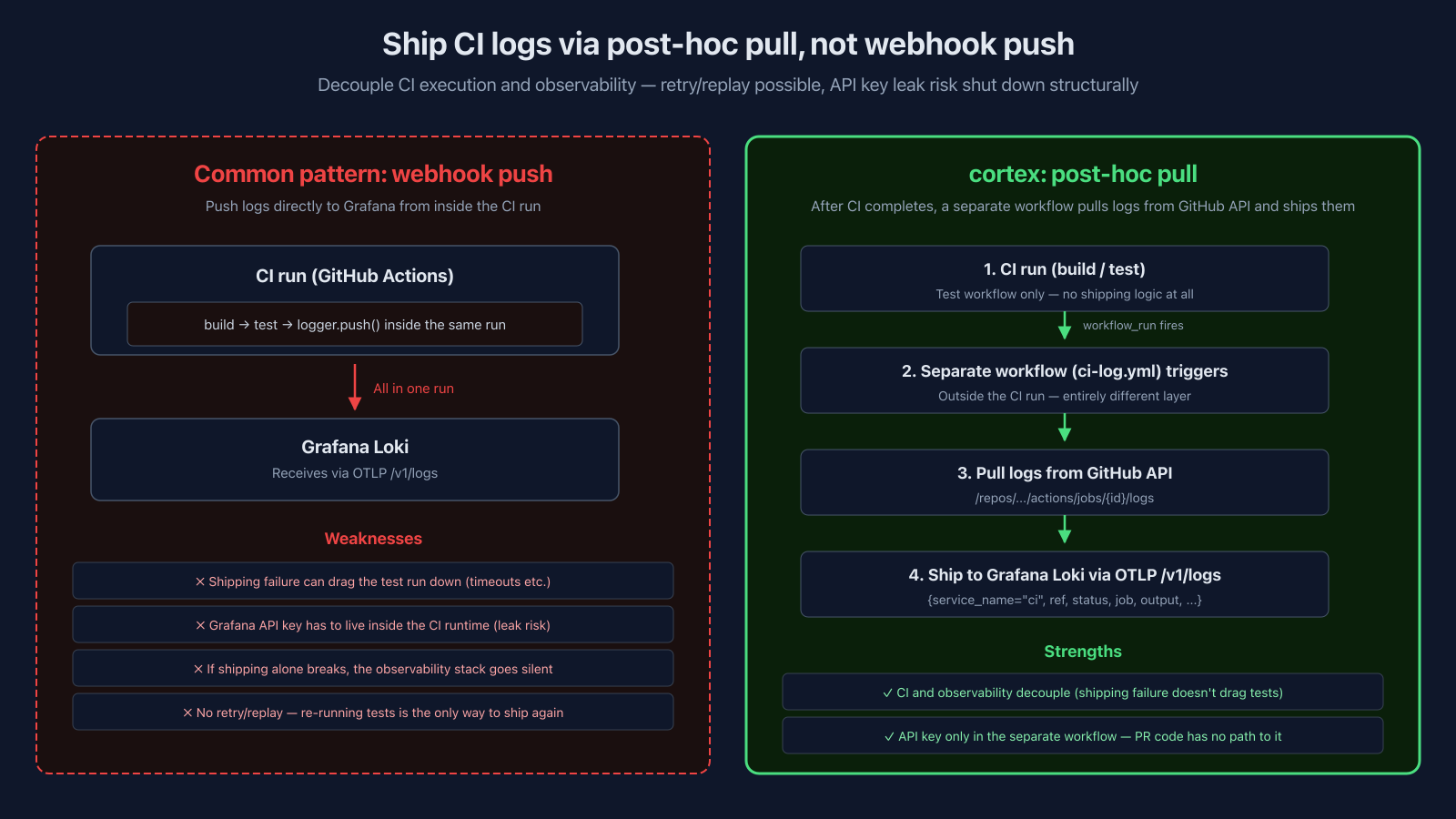
Concretely:
- When the Test job ends, a
workflow_runevent fires - A separate workflow dedicated to log shipping triggers
- That workflow pulls logs from the GitHub API (
/repos/.../actions/jobs/.../logs) - Ships them to Grafana Cloud as structured JSON (job / status / ref / pr / commit / output, etc.) via OTLP
/v1/logs
Filter on {service_name="ci", ref="main", status="failure"} and you get just the main-branch CI failures, cleanly.
Why pull instead of push:
- CI execution and observability decouple. If shipping fails, the test run is unaffected. You can also retry / replay shipping independently
- No path for PR code to touch the API key. The shipping workflow runs in the default-branch context and uses base-repo secrets, not whatever a fork PR brought. The test workflow itself never touches the Grafana API key — that's a structural guarantee, not a "we trust it won't leak"
- Shipping failure becomes observable. If shipping lives inside CI, a shipping bug means the observability stack goes silent — and you don't notice. Split them, and the shipping workflow's success / failure is itself something you can alert on
The moment a main-branch failure shows up, a LogQL alert fires and Slack gets pinged. That's the trigger for Self-Healing, which I cover in Part 2.
LLM — Gemini and Claude Code, Two Different Shapes
The last axis is LLM observability. cortex uses both Gemini API and Claude Code (Anthropic's official CLI) heavily, and since both cost money, I want visibility into how they're used (though the billing models differ — Gemini is pay-per-use, Claude Code is a subscription, and that difference matters later). The reason I shape them differently isn't really about "what kind of question" — it's about where you can instrument — the instrumentation locus:
- Gemini — I own the calling code, so I can wrap every call with a common helper and emit metrics inline. Prometheus is the natural fit.
- Claude Code — It's an external CLI; I can't wrap its calls from the inside. Usage shows up as records after the fact. A structured store (BigQuery) is the natural fit.
The "real-time vs SQL aggregation" framing of the question is a consequence of where you can instrument, not the cause. With that clarified, here's how each one plays out.
Gemini — Prometheus, Cost Visible in Real Time via Client-Side Estimation
cortex uses Gemini everywhere: db-graph table description generation, code-graph field type inference, general context generation. What I want to see is what's expensive right now, with no lag. If a runaway prompt or batch job kicks off, I don't want to wait until tomorrow's billing report.
So every Gemini call goes through a common wrapper (traceGeminiCall) that emits four metrics per call:
gemini.tokens.total— cumulative tokens (labels:model/service/type=prompt|completion)gemini.requests.total— request count (labels:model/service/status)gemini.request.duration— latency histogramgemini.cost.usd— estimated cost (labels:model/service)
The design choice that splits opinions is: who computes the cost? Two options:
- A. Pull from Google Cloud Billing API after the fact — accurate, but billing lags by hours to a day, and there's no per-task cost granularity
- B. Compute client-side from token counts × a price table — instant, with per-task granularity attached by you, but the price table needs upkeep
I picked B. The price table lives in a constant called GEMINI_PRICING and gets manually bumped whenever Google moves prices. Just gemini-3-flash / gemini-3-pro with input/output unit prices each. Nothing fancy.
The real reason for B is real-time visibility:
- Billing lags by hours to a day. A runaway prompt or batch bleeds cost all night before tomorrow's billing surfaces it. Computing client-side, tokens times price right after the call, lets you see "what's expensive right now" at the
servicelevel (code-graph/gcs-transformer/db-dictionaryand so on, app/pipeline-grained) within minutes. That's a speed billing can never match. - Price table maintenance is light (Google doesn't change prices often), so the upkeep cost is trivial.
- Cloud Billing API authentication, fetching, normalization, fan-out is its own pipeline of weight you'd have to maintain.
Then I emit gemini_cost_usd_USD_total as a cumulative Prometheus counter (the doubled usd_USD comes from OTel meter name gemini.cost.usd combined with the unit USD during Prometheus exporter conversion) and PromQL can answer "how much did we spend in the last hour" directly: sum(increase(gemini_cost_usd_USD_total[1h])). Alert fires at $1/hour, info severity, into Slack. In practice this is less an aggregation surface I query after the fact and more a tripwire: the threshold-crossing Slack alert is how a runaway gets caught.
One line worth drawing here: the gemini.cost.usd counter carries exactly two labels, model and service, and service is coarse (a bounded set of app/pipeline names). Try to push call-site-level identity onto the label, "what did that one prompt cost," and the label combinations blow up across many repos and inference types until the time-series DB can't absorb them. So the Prometheus side stays a tripwire: coarse service granularity, immediate alerting, nothing finer. The per-prompt attribution question, "which prompt burned the most this week," isn't a time-series question at all, it's a SQL one. That wants the token records in BigQuery with as much call-site context as you care to attach, which is the same reason Claude Code goes to BQ below. "I can instrument this call" and "this should live as a time series" are separate claims, and the fine-grained aggregation is where Gemini and Claude Code converge back onto the same backend.
Prometheus is what you want when the question is "right now."
Claude Code — Send to BigQuery, Built for SQL Aggregation
Every developer at the company uses Claude Code. But the economics differ from Gemini: it's a subscription, so token usage doesn't translate straight into a dollar figure. What I'm after here is less the cost itself and more the usage picture — who's using how much, how many tokens per repo, how well the cache is landing — so I can turn it into better usage.
The question that split opinion: "Should Claude Code usage go to Loki too?"
The answer: No, into BigQuery.
Why? Because Claude Code usage is, fundamentally, a structured ledger:
email— the userrepository— which repo it was used intimestamp— wheninput_tokens/output_tokenscache_creation_input_tokens/cache_read_input_tokens— prompt-cache effectiveness included
And the questions you want to ask look like:
- "Last week, what's the cumulative spend for Team A members?"
- "How much did edits on Repo X cost over the past month?"
- "What's the prompt-cache hit ratio difference between teams?"
All of these are SQL aggregation questions. LogQL aggregation and joins on Loki are painful. BigQuery, with a DAY partition and email as the primary key, just writes naturally.
So the Claude Code → BigQuery pipeline runs in four stages:
- Emit — A bundled analyzer in Claude Code POSTs
UsageInput(token info only, no email) to an internal endpoint - Auth proxy — A Cloudflare Edge Router worker validates
CORTEX_API_KEYand stamps the user's email onto the request asX-Cortex-User-Email - Ingest — A Cloud Run API dedupes and publishes to Pub/Sub
- Persist — A Cloud Run worker pulls from Pub/Sub, validates the schema, and streaming-inserts to BigQuery
Two structural points worth calling out:
- Identity authority lives at the Edge Router. User identity is resolved exactly once, there. The emit side (Claude Code) never holds the email. This shuts down whole classes of client-side id-spoofing and social-engineering paths structurally
- Pub/Sub gives async decoupling. Ingest and worker are separate, so backpressure on the worker doesn't affect ingest response times. On failure, Pub/Sub DLQ retries up to five times
What sits in BigQuery is visible day-by-day through the internal portal I'll cover in Part 2. Here's what it actually looks like:
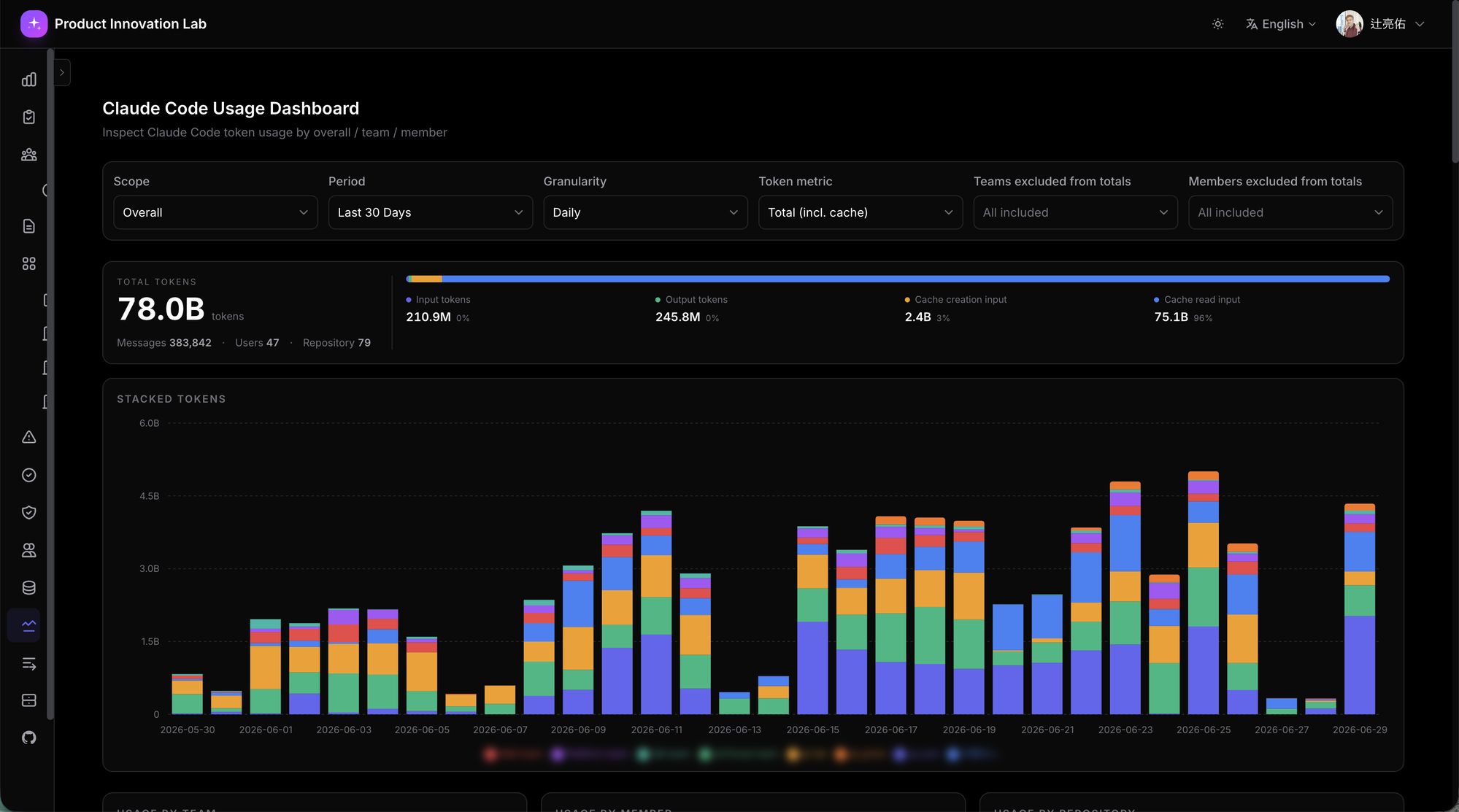
The numbers are interesting enough to mention briefly: in the last 30 days, 78.0B tokens / 384K messages / 47 users / 79 repositories. The one to focus on is Cache Read Input at 75.1B (96% of total) — prompt-cache is dramatically effective. On a subscription this doesn't show up as a dollar figure, but cache read tokens carry roughly 1/10 the effective input rate, so if you were paying per-token API pricing for the same usage, this works out to roughly 7× more efficient at the blended input level versus the cache-less counterfactual. Being able to see usage efficiency as a concrete number like this is the point of the visualization; "aggregation-shaped backend matched to the question" is the design choice that makes this kind of metric fall out of SQL naturally and show up daily. Doing the same thing in LogQL would be a battle.
As a side note: MCP tool-call logs end up in BigQuery too (cortex.mcp_tool_calls), but via a simpler path — each MCP server just writes records directly, no OTel in the loop. The "annotation graph MCP used ~50,000 times by ~73 people" figure from the previous series came from this exact table.
The core point of this layer is: don't dogmatically force everything through OTel — match the tool to the qualitative nature of the aggregation.
To Be Continued
That's the four axes (application / infrastructure / CI / LLM) and the design judgments behind each. The write-side of the observability stack is wrapped up.
But shaping the write side isn't the whole story. The moment production data flows through the stack, PII becomes a constraint you have to design around. And the data has to actually be consumable by AI through MCP, with a thoughtful integration surface for both humans (web dashboards) and AI (MCP). Connect all of that, and the real driver of Self-Healing comes into focus from the observability side. That's the Part 2 story.
Thanks for reading. Part 2, "Observability Design for the AI Era — Reconciling PII Protection With AI Searchability, and Driving Self-Healing," is out now. Read on.
comments (12)
The sink-vs-pump framing in the comments is strong. I’d separate “is it hot right now?” telemetry from “what evidence changed the decision?” records. Prometheus-style counters are great for current pressure, but decision/evidence records need to survive as structured facts: which call site, which source, which retry path, what was repaired, what was trusted, and what changed the downstream result. That split matters even more once AI is consuming the telemetry. The trace is useful, but the facts that explain the decision need to outlive the prompt transcript.
You're pointing at exactly the split the whole harness is built around, though I'd push the durable half one step further than the record itself. The fix landing as a PR is the first layer of that: a PR is a durable evidence record, which source, which repair, what a separate pass verified, all of it outlives the transcript by design. The transcript is what the model saw, the PR is what actually grounded the decision, and those two diverge the moment anything gets retried. We also index those PRs into a separate release graph, so the evidence isn't just archived, it's queryable over MCP later: which change touched what, why it merged, what it was linked to. The record stays a live fact instead of a dead log. But the record alone still only tells you what happened once. The second layer is that every self-healing fix is required to add a lint or type gate as part of the same PR, so the fix doesn't just leave a trace, it leaves a constraint. The same class of failure can't recur, because the evidence got compiled into a rule the next run has to satisfy. I wrote about that recurrence loop in more depth [here](https://dev.to/ryantsuji/fixed-before-anyone-notices-stronger-after-every-fix-self-healing-recurrence-prevention-series-1e86) if you're curious. That's the part I care about most: the decision doesn't just survive as a fact you can reconstruct later, it survives as something the system now enforces.
The part about per-call-site cost attribution is where I want to push back, because I don't think the design as written can actually produce what it claims. You write about wanting to slice by call-site context: "the db-graph table description generation cost $X," "that one prompt cost $Z." But gemini.cost.usd is a Prometheus counter carrying model, service, and type labels. The instant service holds the call-site identity you actually want to slice by, the cardinality goes sideways. A 46-repo codebase pushing field type inferences and table descriptions, each a distinct label value, produces series counts Prometheus is not built to absorb. And if service stays coarse to stay safe, then "the db-graph table description cost $X" stops being answerable from the counter, and you're left with what Cloud Billing already hands you. I learned this the expensive way. Same shape of problem, different vendor. The meter looked healthy, dashboards rendered confident numbers, and somewhere around week three the scrape started timing out because the label space had quietly grown past what the TSDB could chew. The cost chart kept moving on the wall while the storage underneath was choking. So the three escape hatches I've seen work: keep the counter coarse and ship per-call-site detail to BigQuery as structured records (which is the same backend you chose for Claude Code, for the same reason), or attach exemplars with trace IDs so the time series stays clean and a human can drill down on a spike, or just admit that "which prompt cost the most this week" is a SQL question wearing a PromQL costume. The post frames Gemini and Claude Code as wanting different backends. My read is they want the same backend, for a reason the article doesn't quite state. Gemini goes to Prometheus because you can wrap the call. But "I can instrument this call" and "this should live as a time series" are two separate claims, and the cardinality ceiling is exactly where the second one breaks from the first. One thing I'd genuinely like to know: is service in your labels coarse, like a fixed handful of services, or is it carrying a call-site dimension I'm not seeing in the post? Because if it's coarse, the real-time dollar number is real and useful, but the "tune what you can attribute" payoff is softer than the framing makes it sound. And if it's not coarse, I'd love to see how you're keeping the cardinality from eating the TSDB, because that's the part I never solved cleanly.
You're right, and you've caught the article overstating what the counter can do. Let me give you the concrete answer. service is coarse. It's a bounded set of app/pipeline names, meet-pipeline, gcs-transformer, db-dictionary, code-graph, and so on, defaulting to the Cloud Run service name. The gemini.cost.usd counter carries exactly two labels, model and service. There's no call-site dimension on it, precisely because I'd hit the ceiling you're describing if I tried. So your read is correct on both counts. The real-time dollar number is real and useful, but the "which single prompt cost $Z" line in the post promises finer attribution than the counter delivers. That's a framing error on my part, not a thing the counter does. Where I'd push back slightly is on what the Prometheus side is actually for in practice. It isn't the aggregation surface at all. It's a tripwire. The counter exists so sum(increase(...[1h])) crossing a threshold pages Slack, so a runaway prompt or batch gets caught in minutes instead of the next morning's billing. Coarse service is enough for "something in gcs-transformer is on fire right now." That's the job it's doing, and it does it well. The per-call-site question, "which prompt burned the most this week," is exactly the SQL-shaped question you describe, and you're right that it wants the same backend as Claude Code. The token records can land in BigQuery with as much call-site context as I want to attach, no cardinality ceiling, and that's where that question should be answered. The article draws the Gemini/Claude split at "can I wrap the call," but your point is sharper: "can I wrap it" and "should it live as a time series" are different questions, and the second one is where the two converge back onto BigQuery. That distinction is better than the one I published, so I've gone and fixed that section of the post to say what the counter actually does. Thanks for the push.
Lo que más me gusta de este hilo es que todos los ejemplos convergen en la misma idea: las comprobaciones más fiables se hacen en el extremo del sistema, no en el origen. La conciliación del coste, el recuento esperado de ejecuciones de CI, la frescura de una tabla ETL... todos son casos de la misma regla: verificar la evidencia, no asumir que el proceso funcionó. Creo que ese patrón va incluso más allá de la observabilidad. Es una regla de diseño para sistemas con IA: cada capa debería producir evidencia verificable para la siguiente, y ninguna debería confiar únicamente en que la anterior "dice" haber tenido éxito. Al final, la confianza no emerge porque un componente sea fiable, sino porque cada afirmación deja un rastro independiente que otro componente puede comprobar.
That last line is the whole thing: trust doesn't come from a component being reliable, it comes from every claim leaving an independent trace something else can check. That generalizes further than I framed it in the post. It's basically the same reason the AI review layer works in what's coming in Part 2. The model's output isn't trusted because the model is good, it's trusted because it lands as a diff that a separate pass, and a human if needed, can verify against the graph. Same rule, one layer up. Every claim leaves a trace.
The "watch the sink, not the pump" framing from the comments thread is the sharpest distillation of the whole piece. The CI post-hoc pull design is the one I'd steal immediately. The structural guarantee that PR code never touches the Grafana API key isn't just a security win — it's an architectural clarity win. When the shipping workflow itself becomes observable, you've turned a silent failure mode into a monitorable service. That's the kind of design that pays forward for years. The BigQuery vs Loki decision for Claude Code usage is also the right call for a reason slightly different from what's stated. Claude Code on a subscription means the real question isn't cost per token — it's understanding usage patterns well enough to justify the subscription tier or negotiate it. SQL aggregation is exactly the right shape for that question. One thing I'd add to the LLM layer: tracking cache hit ratio per repository rather than just aggregate. The 96% you're seeing overall is impressive, but if two repositories are pulling the aggregate up while three others are cold-missing consistently, the fix (CLAUDE.md tuning, prompt restructuring) is very different per repo. Curious whether you're already slicing it that way.
Yeah, we slice per repo. Interesting thing is the spread is tighter than your hypothesis assumes. Nothing's cold-missing here, pretty much everything clears 90%, and cortex itself sits at 97.7%, which for a repo this size I think is genuinely high. So the per-repo cut mostly confirms the fleet is healthy rather than surfacing outliers to fix. Where it would earn its keep is exactly the scenario you describe, a couple of repos dragging while others quietly starve, and I'd want that visible the moment it happens rather than discovering it in the aggregate. Your subscription reframe is spot on though. The question isn't cost per token, it's whether usage justifies the tier, and SQL aggregation is the right shape for that.
The pricing-table choice is the one place I'd add a tripwire. Computing cost client-side from a GEMINI_PRICING constant buys you real-time visibility and per-call-site granularity, but it also creates a second copy of a fact the provider owns, and duplicated facts drift: the day the price sheet changes, every dashboard keeps rendering confident, specific, wrong dollar numbers, and nothing errors. The fix is cheap, a scheduled job that reconciles your computed spend against the billing API's actuals at day granularity and alerts when the delta exceeds rounding. You keep the inline numbers and the reconciliation catches the quiet divergence before finance does. Same logic as any denormalized cache: the copy is fine as long as something keeps checking it against the source of truth. The decoupled CI shipping has a similar quiet failure worth naming. If the post-hoc pull breaks, the outcome is not an error, it's an empty Loki, and an empty failure stream reads as good news, silence is the one signal every dashboard renders as health. Worth emitting an expected-volume check (N runs happened in GitHub, N landed in Loki, the diff should be zero) so missing data becomes a loud fact instead of a comfortable one. Really solid writeup, the match-the-backend-to-the-question framing is the right way to think about AI-consumable telemetry, and the identity-stamped-once-at-the-edge design is quietly the best part, one attestation point instead of every client asserting who it is. Looking forward to the PII and self-healing half.
Both of these are correct, and you've named the thing they have in common better than the article did. A client-side computed number is a denormalized copy of a fact the provider owns, and a denormalized copy is only safe if something keeps checking it against the source of truth. That's the frame, and I didn't have it in the post. On the pricing table: no, there's no reconciliation job today. The price constant just sits there, and you're exactly right that the failure is silent and confident, which is the worst kind. It's a gap I've been aware of and haven't closed, and "reconcile computed spend against billing actuals at day granularity, alert when the delta exceeds rounding" is the right shape for the fix. Cheap, and it turns a quiet divergence into a loud one before finance finds it. Good catch. The CI one is the same shape on the transport side, and it's the better catch because the failure is even quieter. An empty failure stream doesn't just render as health, it renders as the outcome you were hoping for. Part 2 (next week) spends its closing section on this exact family of problem, but framed at the code entrance: swallowed exceptions, errors logged at info level, the faucet being broken so nothing flows in. What your comment adds is the transport-side version I didn't cover, where the faucet is fine but the pipe between it and Loki broke. The expected-volume check (N runs in GitHub, N landed in Loki, diff should be zero) is the missing piece there. We do run that final-layer freshness idea for our ETL pipelines, monitoring the last table rather than trusting the source succeeded, but the CI shipping path specifically doesn't have it, and it should. The identity-stamped-once observation is the part I'm happiest someone noticed. One attestation point instead of every client asserting who it is was the whole reason for that shape. Thanks for reading this closely, and the PII/self-healing half lands next week.
The final-layer freshness you already run on ETL is the general form of both fixes, honestly: watch the sink, not the pump. Whether the pump is a price constant, a CI shipping workflow, or a source job, the only signal that cannot lie by omission is the destination containing what it should by now. And your reframe is the sharper half of this thread: an empty failure stream does not just read as health, it reads as the outcome you were hoping for, and hoped-for readings are exactly the ones that should cost evidence. If the comfortable interpretation requires a matching count, and the uncomfortable one is the default, the dashboard fails toward truth instead of toward comfort. Looking forward to part 2.
Nice way to put it, "watch the sink, not the pump." I knew the cost side was a weak spot but hadn't worked out how to close it, and tying it to the CI case makes the fix obvious.